

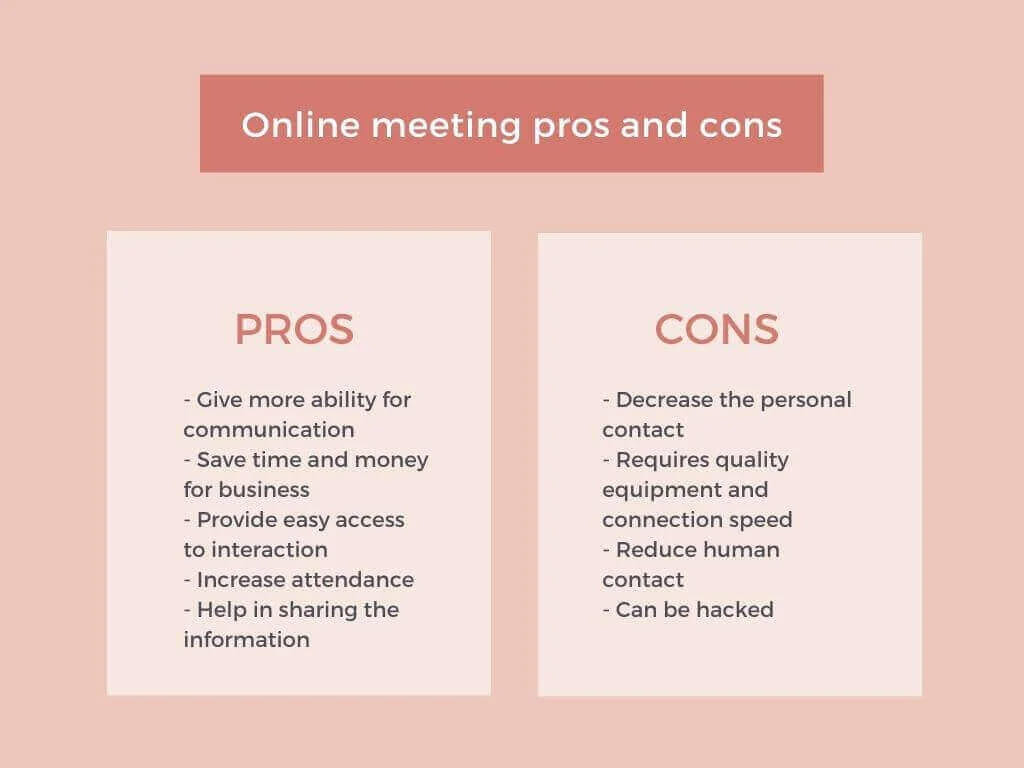
Online meetings help teams, clients, students, and event attendees connect without being in the same room. Their biggest advantages are lower costs, faster communication, easier access, and better flexibility. Their main disadvantages are technical problems, weaker personal contact, security risks, screen fatigue, and lower engagement when the meeting is poorly planned.
Advantages and Disadvantages of Online Meetings
Online meetings are now part of everyday business communication. Teams use them for quick standups, sales calls, onboarding, training, board meetings, interviews, online lessons, and large virtual events. A good online meeting can save hours of travel and help people make decisions faster. A bad one can waste time, create confusion, and make participants feel disconnected.
Researchers say more and more business meetings are held online, and the reason is clear, since remote and hybrid work made digital communication normal for internal teams, clients, and partners. Still, the online meeting advantages and disadvantages are not the same for every company. A short project update, an online business meeting, a webinar, and a strategic discussion all need different levels of structure, moderation, and technical control.
That is why it is not enough to say that virtual meetings are "convenient." To use them well, you need to understand the advantages and disadvantages of online meetings, the broader advantages and disadvantages of online communication, and the situations where a live meeting is better than an email, chat message, or recorded update.
For small internal calls, a simple video meeting may be enough. For client presentations, training sessions, or events with many attendees, it is better to use a reliable webinar platform with registration, moderation, screen sharing, recording, analytics, and engagement tools.

Advantages of online meetings and benefits of virtual meetings
The main advantages of online meetings are speed, accessibility, lower costs, easier collaboration, and the ability to bring people together from different locations. These benefits of online meetings are especially valuable for remote teams, international companies, educators, consultants, and businesses that communicate with clients in different regions.
The same logic applies to the benefits of virtual meetings in education, consulting, sales, and customer success. When people can join from anywhere, organizations can involve more experts, shorten feedback loops, and keep communication active without forcing everyone into the same room.
1. Online meetings remove distance barriers
The clearest advantage of online communication is that people can join from almost anywhere. A manager in Berlin, a client in Warsaw, and a specialist in Toronto can discuss the same project without booking flights or meeting rooms.
This is useful when you need to:
- connect remote employees with the main office;
- speak with international clients or partners;
- invite external experts to a training session;
- include people who cannot travel because of time, health, budget, or location limits.
For global teams, online meetings are often the only practical way to keep communication regular. They make short check-ins possible even when participants live in different countries. These virtual meetings benefits are especially visible when a company works across several offices, time zones, or markets.
2. Online meetings save time
Traditional meetings often take more time than the meeting itself. People need to commute, wait for others, prepare a room, print materials, and sometimes travel between cities. Online meetings remove most of that overhead.
In practice, this means a 30-minute meeting can stay close to 30 minutes. Participants open a link, join from their workplace, and return to their tasks immediately after the discussion.
This advantage is especially important for recurring meetings. Saving 20 to 30 minutes on every weekly call can turn into dozens of hours saved over a year. For many teams, this is one of the strongest meeting benefits because it protects productive work time.

3. Online meetings reduce costs
Online meetings can reduce or remove many expenses connected with in-person communication. Companies do not need to pay for travel, hotels, venue rental, catering, printed materials, or local transport for every meeting.
| Cost area | In-person meeting | Online meeting |
|---|---|---|
| Travel | Often required | Usually not needed |
| Venue | Meeting room or event hall | Virtual room |
| Printed materials | Handouts, agendas, brochures | Digital files and links |
| Time away from work | Higher | Lower |
| Follow-up materials | Manual distribution | Email, recording, chat history |
The cost advantage becomes even stronger for training, product demos, sales presentations, and recurring internal meetings. A company can use the same online format many times without repeating the same logistical costs.
4. Online meetings improve accessibility
Online meetings are easier to attend than physical meetings. Participants can join from home, office, coworking space, or while traveling. This flexibility usually increases attendance, especially when the audience is busy or spread across different locations.
Accessibility also matters for people who need extra flexibility. A parent can join from home. A client can attend without losing half a day to travel. A speaker can give a presentation without leaving their city.
For larger online events, accessibility also depends on the platform. Stable access from different browsers and devices helps reduce barriers for attendees who are not technical users.
5. Online meetings make sharing information and online collaboration easier
During an online meeting, it is easy to share documents, presentations, links, spreadsheets, product demos, dashboards, and videos. Instead of printing materials, organizers can send files in chat or show them directly on screen.
For example, screen sharing is useful when you need to explain a dashboard, demonstrate a product, review a document, or guide participants through a process step by step.
Good information sharing also improves alignment. Everyone sees the same materials at the same time, which reduces misunderstandings and keeps the discussion focused. This is where the advantages and disadvantages of online collaboration become practical. Shared screens and files help people work faster, but only if the host keeps permissions, speaking order, and next steps under control.
6. Online meetings can be recorded
One strong advantage of online meetings is the ability to record the session. This is useful for people who could not attend, new employees who need onboarding materials, or participants who want to review important details later.
A webinar recording can be reused as a training resource, sent to registrants after an event, or reviewed internally to improve future presentations.
Recording is especially helpful for:
- employee training sessions;
- product walkthroughs;
- customer education webinars;
- internal knowledge sharing;
- investor or partner presentations.
However, recording should be handled responsibly. Let participants know that the meeting is being recorded and avoid storing confidential information without a clear reason.
7. Online meetings support data and analytics
Offline meetings often end with subjective impressions, such as "people seemed interested" or "the presentation went well." Online meetings can provide more specific data.
With webinar analytics, organizers can review attendance, watch time, drop-off points, poll answers, engagement activity, and other signals. This helps understand what worked and what should be improved next time.
Analytics are especially valuable for marketing webinars, training programs, and sales presentations because they show not only who registered, but also who actually joined and stayed engaged.
8. Online meetings can increase engagement with interactive tools
A virtual meeting does not have to be a one-way lecture. Chat, Q&A, reactions, file sharing, and interactive activities can make the format more active.
For example, polls and surveys help organizers ask quick questions, collect feedback, check understanding, or let attendees vote on the next topic.
Simple engagement tactics work well:
- ask one question in the first five minutes;
- use polls to break long presentations into smaller parts;
- invite participants to write short answers in chat;
- leave enough time for Q&A;
- summarize decisions and next steps before closing the meeting.
These small actions reduce passive listening and make online meetings more useful for participants.
Disadvantages of online meetings and online communication
The disadvantages of online meetings usually appear when the format is used without planning. Technical issues, poor moderation, weak structure, security gaps, and too many unnecessary calls can turn a useful tool into a source of stress.
Many disadvantages of online communication are not caused by the internet itself, but by unclear rules. If people do not know who should speak, where files are stored, whether cameras are expected, or what decision must be made, the meeting becomes noisy instead of productive.
1. Online meetings reduce personal contact
Online meetings are convenient, but they do not fully replace face-to-face communication. In-person meetings make it easier to read body language, build trust, notice tension, and create informal conversations before or after the meeting. So, what are the disadvantages of in-person meetings compared with online ones? They usually require more time, travel, coordination, and budget. The problem is that online meetings solve those issues while creating another risk, a weaker human connection.
This matters in situations where relationships are important. Negotiations, conflict resolution, complex strategic planning, and sensitive HR discussions may work better in person or in a hybrid format.
A practical approach is simple. Use online meetings for regular updates, training, demos, and operational work, but keep some in-person communication for high-trust or high-stakes situations.
2. Technical problems can interrupt the meeting
An online meeting depends on internet connection, device quality, browser stability, microphone, camera, and platform performance. If one of these elements fails, the meeting can become frustrating.
Common technical problems and challenges of virtual meetings include:
- unstable internet connection;
- poor sound quality;
- echo or background noise;
- camera issues;
- participants joining late because of access problems;
- screen sharing not working correctly.
The best way to reduce this risk is to test everything before important meetings. Speakers should check sound, camera, slides, links, and permissions at least 10 to 15 minutes before going live.
3. Online meetings can cause screen fatigue
Video calls require constant attention. Participants look at a screen, process audio, watch slides, follow chat, and sometimes try to work at the same time. When a company schedules too many online meetings, people become tired and less focused.
Screen fatigue is not only a comfort issue. It lowers the quality of decisions because people stop listening carefully and start waiting for the call to end.
To reduce fatigue:
- keep routine meetings shorter;
- send materials before the meeting;
- cancel meetings that can be replaced with a short written update;
- add breaks during long sessions;
- avoid putting too many video calls back to back.
4. Engagement can drop faster than in person
When participants are in the same room, the speaker can usually see whether people are confused, bored, or ready to ask questions. Online, this is harder. Cameras may be off, chat may be silent, and attendees may be distracted by email or other tasks.
This is why online meetings need stronger structure. The organizer should clearly explain the purpose, agenda, expected result, and next steps.
For sales demos, training sessions, or educational webinars, it also helps to use a clear call to action at the end. Participants should know what to do next, such as booking a consultation, downloading a checklist, completing a task, watching a recording, or registering for another session.
5. Security and privacy risks are higher online
Online meetings can include confidential business information, client data, internal reports, financial details, personal information, or private discussions. If access is not controlled, unwanted participants may join or sensitive information may be exposed.
Security risks do not mean that online meetings are unsafe by default. They mean that organizers should use basic protection measures. This is also why searches like "is Zoom safe and secure," "Zoom advantages and disadvantages," or "pros and cons of Zoom" are common, because people want to know whether the tool they use protects access, recordings, and private information.
- use unique meeting links;
- protect important sessions with passwords or registration;
- avoid sharing public access links for private meetings;
- control who can speak, share screen, or enter the room;
- remove unknown participants if needed;
- do not record sensitive meetings without a clear policy.
For companies, security should be part of the meeting process, not an afterthought.
6. Poor planning becomes more visible online
An unstructured offline meeting can still be saved by informal conversation. Online, weak planning becomes obvious faster. If the organizer has no agenda, poor slides, unclear timing, or no moderation, participants disengage quickly.
Every important online meeting should answer four questions before it starts:
| Planning question | Why it matters |
|---|---|
| What is the purpose? | Keeps the discussion focused |
| Who really needs to attend? | Reduces wasted time |
| What should be prepared? | Helps participants contribute |
| What should happen after the meeting? | Turns discussion into action |
If there is no clear answer to these questions, the meeting may not be needed.
7. Not every meeting should be live
Some teams use live meetings for everything. This creates meeting overload. In reality, not every update, training, or explanation needs real-time participation.
For repeated onboarding, product education, or standard training, automated webinars can be more practical. The organizer prepares the content once, and attendees can watch it at a convenient time.
Live meetings are better when people need discussion, feedback, decisions, or personal interaction. Automated formats are better when the goal is to deliver the same information repeatedly.

Meeting advantages and disadvantages compared
Online meetings are not "better" or "worse" than in-person meetings in every case. They are better for some tasks and weaker for others. The table below summarizes meeting advantages and disadvantages so it is easier to decide which format to use.
| Factor | Advantage | Possible disadvantage |
|---|---|---|
| Cost | Lower travel and venue costs | Requires paid software for advanced features |
| Speed | Faster setup and easier scheduling | Can lead to too many meetings |
| Accessibility | People can join from anywhere | Time zones may be difficult |
| Collaboration | Easy file sharing and screen sharing | Less natural body language |
| Engagement | Polls, chat, Q&A, recordings | Participants can become passive |
| Security | Access can be controlled | Poor settings may expose private data |
| Follow-up | Recordings and analytics are available | Recordings must be managed carefully |
The best choice depends on the goal. A weekly team update can be online. A sensitive negotiation may require a face-to-face meeting. A product demo can work well as a live webinar. A repeated training session may work better as an automated webinar. This is the most useful way to think about the advantages and disadvantages of meetings, not as a single rule, but as a choice between format, audience, and expected result.
When virtual meetings work best
Online meetings are most effective when the goal is clear and the format matches the audience. The advantages of virtual meetings are strongest when participation, speed, and access matter more than physical presence. They work especially well for:
- remote team check-ins;
- client updates;
- product demos;
- online training;
- customer onboarding;
- educational sessions;
- marketing webinars;
- investor updates;
- internal knowledge sharing;
- distributed project management.
For large sessions where one or several speakers present to many attendees, live webinars are often more effective than a standard video call. They give organizers more control over registration, moderation, presentation flow, audience questions, and follow-up. This is also where virtual events pros and cons differ from small meetings. Reach and scalability are higher, but the organizer must plan engagement more carefully.
How to make online meetings more effective
The quality of an online meeting depends less on the technology itself and more on how the meeting is planned and moderated. A strong platform helps, but the organizer still needs structure. The advantages and disadvantages of team meetings online depend heavily on agenda quality, participant discipline, and follow-up.
Use this simple checklist before every important session:
- Define one clear goal for the meeting.
- Invite only people who need to be there.
- Prepare an agenda and send it in advance.
- Test microphone, camera, slides, links, and screen sharing.
- Start with the purpose and expected result.
- Use chat, polls, or questions to keep people engaged.
- Summarize decisions before the meeting ends.
- Send the recording, notes, and next steps after the session.
This approach helps keep online meetings practical instead of turning them into another calendar habit.
Key takeaways on the advantages and disadvantages of online meetings
Online meetings are valuable because they make communication faster, cheaper, and more accessible. They help people collaborate across locations, share information in real time, record sessions, collect data, and keep projects moving. In short, the pros and cons of virtual meetings come down to one question. Does the format help people make progress with less friction?
At the same time, online meetings have real disadvantages. They can reduce personal contact, create screen fatigue, depend on technology, expose security risks, and become ineffective when they are not planned properly.
The right approach is balance. Use online meetings when they save time, improve access, or make collaboration easier. Use in-person meetings when trust, sensitivity, or deep relationship-building matter more. For webinars, training, and larger virtual events, choose tools that support engagement, recording, analytics, and secure access. This balance also applies to online communication advantages and disadvantages in general. Digital tools are powerful, but they need clear rules and human moderation.
Online meeting meaning and definition
The simple online meeting definition is a meeting held over the internet where participants communicate through audio, video, chat, and shared content. In everyday use, online meeting meaning can include a small team call, client presentation, remote lesson, virtual training session, or online business meeting.
A virtual meeting meaning is very similar, but the phrase is often used more broadly. It can describe video meetings, webinars, virtual conferences, and structured online events where participants interact without being physically present in the same place.
FAQ: Advantages and disadvantages of online meetings
What is an online meeting?
An online meeting is a meeting held over the internet using audio, video, chat, and collaboration tools. Participants join from different locations instead of gathering in one physical room.
What are the main advantages of online meetings?
The main advantages of online meetings are lower costs, time savings, easier access, faster communication, simple document sharing, recording options, and the ability to include people from different locations.
What are the main disadvantages of online meetings?
The main disadvantages of online meetings are technical issues, weaker personal contact, lower engagement, screen fatigue, privacy risks, and poor results when the meeting has no clear structure.
Are online meetings better than face-to-face meetings?
Online meetings are better for quick updates, remote collaboration, training, demos, and recurring communication. Face-to-face meetings are usually better for sensitive discussions, relationship building, complex negotiations, and situations where body language matters.
How can I keep people engaged during online meetings?
Keep the meeting focused, use a clear agenda, ask questions, involve participants through chat, add polls when relevant, avoid long monologues, and summarize next steps at the end.
Should online meetings be recorded?
Online meetings should be recorded when the recording has a clear purpose, such as training, documentation, follow-up, or sharing the session with people who could not attend. Participants should know that the meeting is being recorded.
What is the best way to reduce online meeting fatigue?
Reduce fatigue by keeping meetings shorter, avoiding unnecessary calls, adding breaks to long sessions, sharing materials in advance, and replacing some meetings with written updates or recorded content.
What features should an online meeting platform have?
A strong online meeting or webinar platform should include stable video and audio, screen sharing, chat, recording, attendee management, engagement tools, analytics, and security settings.
What are some benefits of online meetings?
The main benefits of online meetings are lower travel costs, faster scheduling, easier access for remote participants, simple screen sharing, recording options, and better follow-up through chat history, files, and analytics.
What are the disadvantages of virtual meetings?
The main disadvantages of virtual meetings are weaker personal contact, technical problems, screen fatigue, lower engagement, privacy risks, and the possibility that people become passive when the meeting has no clear structure.
What are the pros and cons of online communication?
The pros and cons of online communication depend on context. The advantages are speed, accessibility, lower costs, and easier collaboration across locations. The disadvantages are miscommunication, reduced body language, technical dependence, security risks, and possible information overload.
What are the advantages and disadvantages of webinar formats?
The main advantages and disadvantages of webinar formats are connected with scale. A webinar can reach many people, support recordings, collect registrations, and use polls or Q&A. The downside is that it needs stronger moderation, better preparation, and more engagement planning than a small meeting.
Which is the best app for online meeting?
The best app for an online meeting depends on the goal. A small internal call needs stable audio, video, and chat. A webinar, training session, or online event needs registration, screen sharing, recording, analytics, moderation, and engagement tools.
Zoom vs Google Meet: which one is better?
Zoom vs Google Meet usually depends on team habits, budget, security settings, and required features. Both can work for simple video meetings. For webinars and larger virtual events, it is better to compare dedicated webinar platforms as well, especially if you need registration, attendee analytics, automated webinars, and structured audience engagement.