
Best webinar platforms in 2026, compared honestly
Seven platforms side by side, including our own. There are no ranking numbers here, because there is no single best webinar platform, only a best fit for what you actually run. Six of the seven beat us at something, and each of them gets a paragraph saying exactly where.
Every figure below comes from the other company's own pricing page rather than from somebody else's comparison. Each one carries the date it was checked, which is 1 September 2026. ClickMeeting, LiveWebinar and WebinarJam were re-checked on 5 September, the session length row on 6 September and Zoom's published tiers on 4 October. Where Livestorm keeps its data comes from its help centre article "Livestorm Data Server Location", checked on 2 October 2026, because its pricing page names only the video region. GoTo Webinar and WebinarJam publish in US dollars and the rest in euros. You have to convert those two yourself before they sit on the same scale as the rest. Prices move, so treat all of it as a snapshot.
This page is written by MyOwnConference. That is a reason to read it carefully, not a reason to skip it, so every platform gets a section on where it is genuinely better than us. A comparison that finds no fault with its own author is not a comparison.
Choose by your situation
The honest way to pick is to start from what you run rather than from a list. Find your condition and read who fits it.
| If this is you | Best fit | Why |
|---|---|---|
| Webinars every week, to a regular audience | MyOwn | A fixed room price. 500 attendees is €110 a month, or €88 billed yearly, for unlimited events. |
| One large event a year | Livestorm | You pay €2.50 per unique attendee who actually arrives, and no-shows keep their credit. At a single event a year that shape is cheaper than ours. |
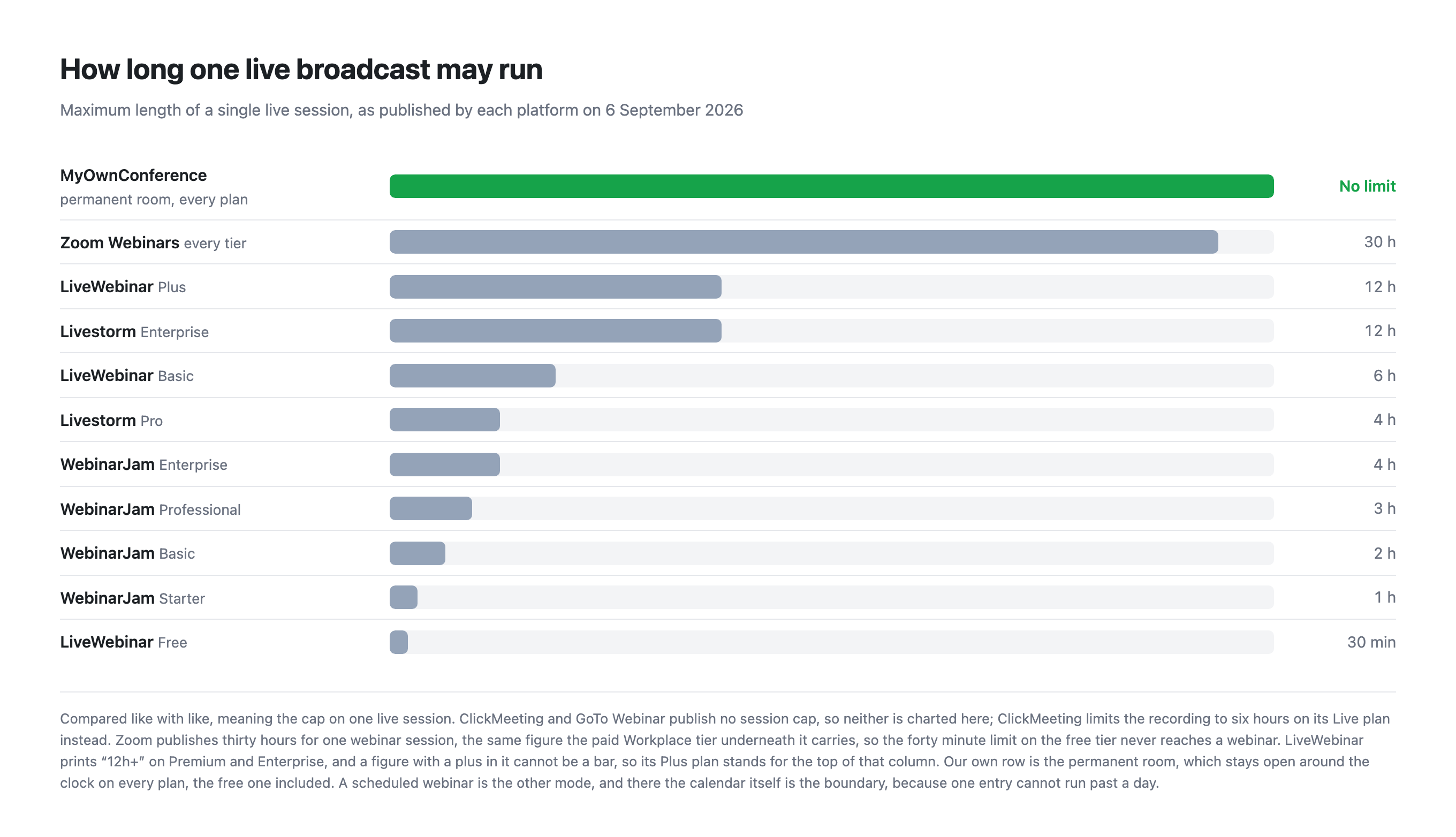
| Sessions with no clock on them at all | MyOwn | No cap on live length on any plan. Zoom publishes 30 hours, LiveWebinar 12 on Plus, Livestorm 12 on Enterprise and WebinarJam 4 at the top, while ClickMeeting and GoTo publish no figure at all. |
| Certificates of attendance | ClickMeeting or GoTo Webinar | ClickMeeting issues them on its Automated plan and GoTo on its upper plans. We issue none at all. |
| The webinar exists to sell something | WebinarJam | Offers, split testing on registration pages, email and SMS reminders and a chat simulator, all in one box. We have call to action banners and landing pages, not the whole kit. |
| An audience well above 5,000 | Zoom | Their published tiers run to 5,000, with 10,000 and more on request, and Zoom Events goes further. We stop at 5,000. |
| A ready made connector for your stack | ClickMeeting | More than 4,000 integrations against our public API. If your stack expects a connector rather than an API, that gap is wide. |
| AI summaries or live transcription today | Zoom, GoTo or ClickMeeting | All three ship AI features. We ship none, which is a choice rather than a gap we are working on. |
| Breakout rooms | ClickMeeting, GoTo Webinar or LiveWebinar | ClickMeeting has them on every plan, the trial included, GoTo from the middle plan, and LiveWebinar sells them as an add-on below Enterprise. We have none. |
| Nobody on the team may install anything | ClickMeeting or LiveWebinar | Both indicate that screen sharing needs no installation. Our presenters install a small program for it, and it does not run on Linux. |
| A corporate network that blocks UDP | MyOwn | Alongside the browser route we run our own broadcasting protocol, which needs nothing beyond TCP port 443 in most cases and switches on by itself in every room. |
| EU data residency as a default rather than a setting | MyOwn | Our servers are in the EU with nothing to configure, and video can reach attendees through global CDNs (Cloudflare, Bunny.net and Amazon CloudFront). Livestorm stores its data in Ireland on every plan, but its live video goes through the nearest server worldwide unless you buy the add-on that pins it to EU or US servers, and GoTo, WebinarJam and Zoom do not state a region on their pricing pages. |
| One event, no subscription | MyOwn | A single day from €11, bought on its own. None of the other six sells you a day. |
| More people arrive than you paid for, mid-webinar | MyOwn | Another 100 seats for €18, bought from inside the running room, as often as it takes, on every plan. |
| Two weeks of rehearsal with a realistic audience | ClickMeeting | Their 14 day trial holds 25 attendees and asks for no card. Our free plan holds 5, forever, with a watermark on it. |
| Several colleagues host, on a small budget | MyOwn | Unlimited account users, free, with per-area permissions on every plan. GoTo sells organiser seats, Zoom charges €13.33 per licence, and WebinarJam ties hosts to plan size. |
Nine of those sixteen rows send you somewhere other than here. That is not modesty, it is the only way a page like this is worth reading.
If you run a small business, our small business comparison works out what a year of weekly webinars for 50 people costs on each platform, Demio included.
Where the money crosses over
The most useful thing in this comparison is not a feature, it is the shape of the bill. Livestorm charges €2.50 for each unique attendee who turns up, and we charge for the size of the room whether it fills or not. Those two shapes cross, and the crossing point decides which of us is cheaper for you.
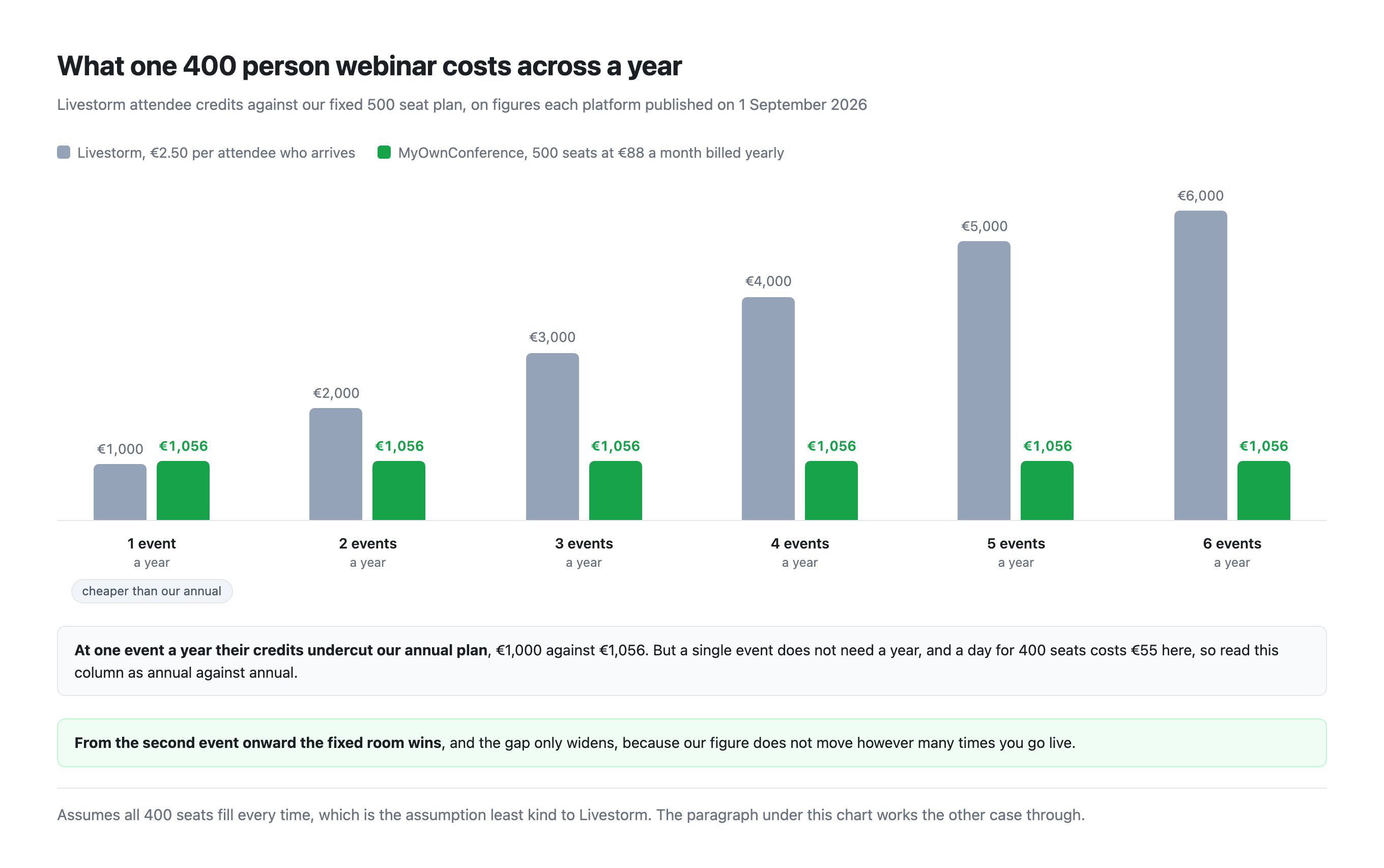
Two assumptions sit under that chart and both of them matter. It counts all 400 seats as filled at every event, which is the reading that helps Livestorm least, because they bill only for the people who actually arrive. Halve the turnout and their figure halves with it. That pushes the crossing point out to somewhere between two and three events a year, while ours does not move at all. Our column is the 500 seat plan at €88 a month billed yearly, which is the nearest room size above 400, and it carries unlimited events. Livestorm sells credits in yearly packs rather than one at a time, so a real invoice there rounds up to the nearest pack.
Run one 400 person event a year and Livestorm costs €1,000 in credits, against €1,056 for our 500 seat plan billed yearly. That is annual against annual and the only reading where they come out ahead, because a single day for 400 seats costs €55 here. Run that same event twice and the credits cost €2,000 while our figure has not moved. Run it every month and they cost more than ten times what we do.
So the question is not which platform is cheaper, it is how often you go live. At a single large event their credits sit just under our annual plan, though a day here costs €55. Above it, a fixed room wins, and it keeps winning by more.
The seven platforms
ClickMeeting
The closest competitor to us in shape. It is European, it is built for webinars rather than meetings, and it is priced by room size. The differences sit in what automation costs and in what happens before you pay.
They are better at five things. Nobody there installs anything, screen sharing included. Our presenters install a small program for it, and that program does not run on Linux. They issue certificates of attendance on the Automated plan and we issue none. They have more than 4,000 integrations against our public API. They ship live and AI transcription, which we do not. And they have breakout rooms on every plan, the trial included, where we have none.
We are better at four others. Our free plan does not expire and runs the same product as the paid ones, minus the paid extras. Automation is on every plan here instead of on a dearer tier. Their Live plan is €31.92 a month for 50 attendees and Automated is €42 for the same 50. We put no limit on how long you stay live, and record for 10 hours on paid plans against their 6. And a single day costs €11 with no subscription behind it.
The full ClickMeeting comparison has the side by side table.
GoTo Webinar
The name an IT department already knows, and that counts for something once procurement gets involved. The comparison turns on how much of the price you are allowed to see.
They are better in the places a large company checks first. Certified training and paid events come with the upper plans. AI summaries and transcripts start from the middle plan. They have breakout rooms and we have none, and their top plan throws in a meetings licence.
We publish every price we charge, which is €22 a month for 20 attendees, €110 for 500 and €275 for 1,000. GoTo publishes one plan out of three, at $69 a month or $59 billed annually for 500, and the other two are a conversation. We also have a permanent free plan and they have none. Automation is on every plan here, while their simulive starts from the middle one. And our data sits in the EU, billed in euros by a European company.
The full GoTo Webinar comparison has the side by side table.
Livestorm
Livestorm prices webinars in a way none of the others do, at €2.50 per attendee credit, spent as people actually turn up.
They are better in four places. You pay for the people who came rather than for the seats you reserved, and a registrant who never shows up keeps their credit. Recording is unlimited on Pro, while our free plan stops at 20 minutes. Their design and polish are better than ours, and we are not going to pretend otherwise. AI Studio and live translation exist there as paid add-ons.
We are better in four others. Our free plan is permanent and theirs is a trial. EU hosting is included here rather than sold as a region add-on. We put no cap on a session at all, against their 4 hours on Pro and 12 on Enterprise. And for anyone with a regular webinar habit the fixed figure wins, as the chart above shows.
The full Livestorm comparison has the side by side table.
LiveWebinar
The one competitor whose free plan looks like ours at a glance, at five attendees and no cost. The resemblance ends on the second line of the specification.
They are better at breadth. Breakout rooms, closed captioning, chat translation, an agenda creator, a presence manager and a long list of tools we simply do not have, though the first two are add-ons on every plan below Enterprise. Their pricing is a la carte, so buying exactly one extra can cost less than moving up a plan. Screen sharing needs no installation as far as their materials indicate. Their free plan carries five cameras against our two speakers.
We are better where the plan meets the invoice. No time cap on any plan here, against 30 minutes free and 6 hours on Basic. Our free plan records 20 minutes and theirs records nothing at all. Automation, landing pages and lead capture are in our price rather than sold on top. Their Basic plan costs €24 a month billed yearly for 25 attendees, and it marks twelve features as extras you buy separately. And our support answers in English, Polish, Russian and Ukrainian, while their free support answers in English only.
The full LiveWebinar comparison has the side by side table.
WebinarJam
WebinarJam is built for one job, which is selling from a webinar, and it is unusually direct about saying so.
They are better at that job than we are. The funnel tooling arrives in one box, with offers, split testing, email and SMS reminders and a live chat simulator. EverWebinar is a mature automated product bundled from Basic upward. At the top of their range you get more people per dollar than anywhere else here, at 5,000 on Enterprise for $379 a month billed yearly. They send SMS reminders and we send email and Telegram, with no SMS at all.
We are better wherever the clock matters. There is no limit on a live session here, against their 1 hour on Starter rising to 4 on Enterprise. Our free plan is permanent, against a $1 trial for 14 days and a 30 day money back guarantee. Our plans start at 20 attendees for €22 and their smallest room holds 100. And we bill in euros from a European company with the data in the EU.
The full WebinarJam comparison has the side by side table.
Zoom Webinars
The tool most people already have open. Zoom sells webinars as a separate paid licence that sits on top of a paid meetings licence. That one fact about how it is sold drives most of the comparison.
They are better at scale and at everything around the product. Their AI does meeting summaries, note taking and a great deal more. Their published tiers run to 5,000, with 10,000 and more on request and Zoom Events beyond that. We stop at 5,000. If your calendar, phone and chat are already Zoom then the ecosystem argument is real. And every attendee already knows what a Zoom link is.
We are better at the small end and at the starting line. At 500 attendees the two prices are within a couple of euros. Zoom comes to about €90 a month once you add the Workplace Pro licence it requires at €13.33, and we are €88 billed yearly. Below 100 attendees we are clearly cheaper, because our plans start at 20 seats and their smallest webinar tier holds 100. Starting here costs nothing and stays free. Zoom has no free webinar tier at all. Colleagues are free and unlimited here, and every one of them is a paid licence there.
The full Zoom comparison has the side by side table.
MyOwnConference
Our own entry, written to the same rule as the other six.
Where we lose, plainly. We issue no certificates, we have no breakout rooms and no closed captioning. We have no AI features at all, by choice, so if you need them today then three platforms above have them. Screen sharing needs a small program of ours that runs on Windows and macOS and not on Linux. Our free plan holds 5 attendees, puts a watermark on the broadcast and records only 20 minutes. We offer a public API rather than a catalogue of ready made connectors. And we stop at 5,000 attendees, while Zoom goes further.
What we hold to. No cap on live length on any plan, the free one included. Automation, landing pages, branding, polls, tests, the whiteboard, call to action banners and the full analytics set on every plan, free included. Unlimited free account users with per-area permissions. A day for €11 bought on its own, and another 100 seats for €18 from inside a running room. EU servers and euro billing as defaults rather than as options.
The full matrix
Every cell was taken from the vendor's own pricing page on 1 September 2026, and the ClickMeeting, LiveWebinar and WebinarJam columns were re-checked on 5 September, with the session length row re-read across all seven on 6 September. Livestorm's data location is the one exception, taken from its help centre on 2 October 2026. GoTo and WebinarJam figures are in US dollars and the rest in euros.
| MyOwn | ClickMeeting | GoTo Webinar | Livestorm | LiveWebinar | WebinarJam | Zoom Webinars | |
|---|---|---|---|---|---|---|---|
| Free plan | Permanent, 5 attendees, no card | None, 14 day trial for 25 | None | None, trial only | 5 attendees, 30 minute sessions, no recording | None, but $1 for a 14 day trial | None for webinars |
| Entry paid plan | €22 a month for 20 | €31.92 for 50, billed yearly | $69, or $59 yearly, for 500 | €2.50 per attendee credit | €24 for 25, billed yearly | $39 yearly for 100 | A webinar licence on top of a paid Workplace one |
| Live session length | No cap in a permanent room | Not capped | No published cap | 4 h Pro, 12 h Enterprise | 30 min free to 12h+ Premium | 1 h Starter to 4 h Enterprise | 30 h a session |
| Recording | 20 min free, 10 h paid | Up to 6 h on Live | Cloud from the middle plan | Unlimited on Pro | None free, 1 h on Basic | Included | Not stated on the pricing page |
| Automated webinars | Every plan, one a day free | Only Automated, at €42 | Simulive from the middle plan | Replays, each spending a credit | Not on Basic, from Plus | EverWebinar from Basic up | Higher webinar tiers |
| Colleagues in the account | Unlimited, free, per-area permissions | 3 extra logins on Live | One organiser seat | Unlimited, not counted | None free, 5 on Basic | 1 to 6, tied to plan size | Each needs a €13.33 licence |
| Where the data sits | European Union, included | European company, region not stated | Not stated on the pricing page | Ireland on every plan, with EU or US video servers as a paid add-on | Not stated on the pricing page | Not stated on the pricing page | Not stated on the pricing page |
| AI features | None, by choice | Live and AI transcription | Summaries from the middle plan | AI Studio, a paid add-on | Not stated on the pricing page | Not stated on the pricing page | Extensive |
| Certificates | No | Yes, on Automated | Yes, upper plans | Not stated on the pricing page | An add-on | Not stated on the pricing page | Not stated on the pricing page |
| Breakout rooms | No | Yes, every plan | Yes, middle plan | Not stated on the pricing page | An add-on | Not stated on the pricing page | Not stated on the pricing page |
| Buy a single day | Yes, from €11 for 20 attendees | No | No | No, credits come as a yearly pack | No | No | Pay per attendee, on top of a paid licence |
| Overrun mid-webinar | +100 seats for €18 from inside the room | Move up a package | The rest wait for a place | Once credits are gone, nobody new | Capacity is an add-on in the panel | Write to their billing team | Wait for somebody to leave |
| Presenter installs | A small program for screen sharing, no Linux | Nothing | Not stated on the pricing page | Not stated on the pricing page | Nothing | Not stated on the pricing page | Browser join, which an admin can switch off |
"Not stated on the pricing page" means exactly that. We report what the vendor publishes and we do not fill the gaps with assumptions.
Three things that repeat across all six
Nobody else sells a day. A one off event everywhere else means opening a subscription and remembering to close it. A day here starts at €11 and stops on its own.
Nobody else lets you grow the room while you are in it. When more people arrive than you paid for, our presenter buys another hundred seats for €18 without leaving the running room. It works as often as the event needs it to, on every plan including the free one. Everywhere else that moment becomes a bigger package or a conversation with billing.
Almost everyone caps the broadcast. Livestorm, LiveWebinar and WebinarJam cap live length by plan. ClickMeeting caps the recording at six hours rather than the broadcast, GoTo publishes no cap, and Zoom caps the free meetings tier underneath the webinar licence. We cap the recording at 20 minutes free and 10 hours paid, and we cap nothing else.
What is not on this page, and why
Platforms we have not studied. BigMarker, ON24, WebinarNinja, Univid and others sell into this market, and we have not compared any of them here. We have not put them through the same check against their own pricing page, and listing a platform we have not read properly would make this page longer and less true. Demio is checked on our small business comparison instead, because small businesses are the market it sells to. Microsoft Teams, Google Meet and Webex are a different question. They are meetings tools that can host a webinar rather than webinar platforms, so they are not on the same shelf. We look at that shelf separately in our roundup of video conferencing apps.
Review scores and testimonials. We publish none on our own site, so we do not weigh anyone else's either.
Uptime and performance. Nothing here was load tested, by us or by anyone we can cite.
Currency conversion. GoTo and WebinarJam price in US dollars and the rest in euros. We show the figures as published rather than converting them on a rate that will be stale by the time you read this.
Frequently asked questions
Which is the best webinar platform in 2026?
There is no single answer, which is why this page carries no ranking. The choice turns on how often you go live, how many people arrive, how long the session runs and whether you need certificates, breakout rooms or AI. We arranged the table near the top of this page by those conditions rather than by score, so the useful move is to find your own row.
Is there a webinar platform with a genuinely free plan?
Two of the seven. Ours holds 5 attendees permanently, records 20 minutes and puts a watermark on the broadcast. LiveWebinar's holds 5 attendees too, caps a session at 30 minutes and records nothing. ClickMeeting and WebinarJam offer trials rather than free plans, and GoTo, Livestorm and Zoom have no free webinar tier at all.
Which webinar platform is cheapest?
It depends entirely on how often you go live. For a single large event a year, Livestorm's €2.50 per attendee is the cheapest shape, because you pay only for the people who arrive. For anything more frequent, a fixed room price wins and keeps winning, which is €22 a month here for 20 attendees and €110 for 500.
Can I buy a webinar platform for one day?
With us, yes, from €11 for 20 attendees with no subscription behind it. None of the other six platforms on this page sells a single day, so a one off event elsewhere means opening a monthly or annual plan and remembering to cancel it.
Which webinar platforms keep data in the EU?
Our servers are in the EU with nothing to configure, and video can reach attendees through global CDNs (Cloudflare, Bunny.net and Amazon CloudFront). Livestorm stores its data and databases in Ireland on every plan, while its live video goes through the nearest server worldwide unless you buy the add-on that pins it to EU or US servers. ClickMeeting is a European company but does not state a data region on its pricing page, and GoTo, WebinarJam and Zoom do not state one either. If EU residency has to be a default rather than a setting, that narrows the list quickly.