Four ways the bill stays the size of what you actually run.
Pay for the room, not per attendee
Every attendee and every extra host makes the bill bigger.
You choose a room size and run as many webinars in it as you like. A room for 500 attendees is €110 a month, or €1,056 billed yearly, however many of them turn up.
More people arrived than I paid for, right in the middle of the webinar.
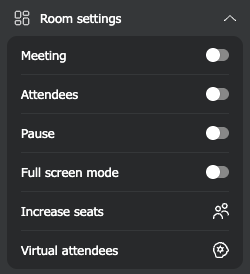
The presenter opens the room menu and buys another 100 seats for €18, without leaving the webinar. The room grows within a few seconds, on every plan including the free one.
Free plans end after two weeks, or cut the webinar off after half an hour.
The free plan holds 5 attendees and never expires, as long as you sign in once every six months. There is no payment card and no limit on how long you are live in a permanent room. Recordings run up to 20 minutes, analytics are included, and you can add your logo and colours. The plan is meant for non-commercial events, so the broadcast and the recording carry our watermark.
Half my audience gives up when they are asked to install an app.
Attendees open the link in their browser, usually type just their name, and they are in the room. There is nothing to install on a laptop, a phone or a tablet, and the room is available in 34 languages, so each of them can read it in their own.
An adaptive protocol switches on by itself for every permanent room and every scheduled event, and in most cases it needs nothing beyond TCP port 443. Presenters behind a company firewall usually have nothing to set up.
I only find out the camera or the microphone does not work once we are live.
A free tester checks a presenter's camera, microphone, speakers and internet, and an attendee's internet speed, ping and jitter, before the webinar starts.
Colleagues share the work without sharing a password.
Your whole team, at no extra cost
Each colleague who needs access costs another licence.
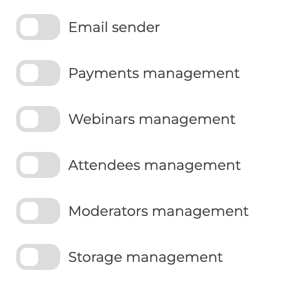
Add as many users to your account as you need. They cost nothing, there is no limit on how many you create, and the number does not change with your plan, the free one included. Six switches decide what each of them can do, from sending emails to managing storage.
Servers in the EU and a published data processing agreement
We need to know where attendee data goes before we can sign up.
Our servers run in EU-based Tier III data centers, and personal data is processed under a data processing agreement that anyone can read. Video can reach attendees through global CDNs (Cloudflare, Bunny.net and Amazon CloudFront).
Some things are missing on purpose. Here is what, and why.
We do not charge per attendee
You pay for the size of the room, so a full house costs the same as a quiet day.
We do not cut a broadcast short
In a permanent room no plan puts a clock on a live session, the free one included.
We do not ask for a card to start
You sign up with an email address, no payment card is asked for, and the free plan stays free.
We do not add AI features
We would rather not have a machine stand in for a presenter, and live transcription and translation are still costly and weaker than editing afterwards.
Check it in a few minutes
Start a free room with no card, test your camera and microphone, or follow the step-by-step guide to your first webinar.