
Sub-user accounts and what each one may reach
Everything in your account belongs to one login by default, and that becomes awkward the moment a second person needs to work in it. Sub-user accounts solve that. Each colleague gets their own sign-in and only the parts of the control panel you tick, so the person who sends invitations never sees your card details.
They cost nothing. There is no limit on how many you create, and the number does not change with your plan, the free one included.
Sub-users are not moderators
These are two different layers, and mixing them up leads to the wrong screen.
- Moderators and speakers belong to a webinar. They go on air, run the chat and take a speaker slot in the room, which is why your plan caps how many can be on camera at once. Moderator and presenter management covers that side.
- Sub-users belong to the account. They sign in to the control panel and work with the sections you allow. Nothing about them touches the room or the speaker count.
The same person can of course be both, but you add them in two different places.
Where the section lives
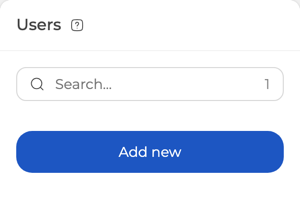
Open your profile and go to the "Users" tab. The list shows everyone who already has access, with a search box and a counter above it, and "Add new user" opens the form.
Adding somebody
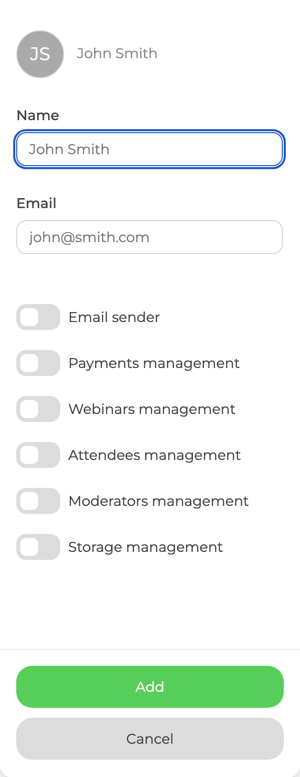
The form asks for two things.
- "Name" is what you will see in the list afterwards, up to 64 characters.
- "Email" is their username. It is what they sign in with, so it has to be an address they actually read.
Then come the switches. Each one opens a single area of the control panel, and everything you leave untouched stays out of reach.
| Switch | What it opens |
|---|---|
| "Email sender" | Sending mail from the account |
| "Payments management" | Billing, plan and card details |
| "Webinars management" | Creating and editing webinars and rooms |
| "Attendees management" | Attendee lists, registrations and invitations |
| "Moderators management" | The account's moderators and speakers |
| "Storage management" | Uploaded files and recordings |
Tick what the person needs and leave the rest alone. Somebody who only prepares events gets webinars and attendees; somebody who only handles the audience gets attendees alone.
Only one person may send mail
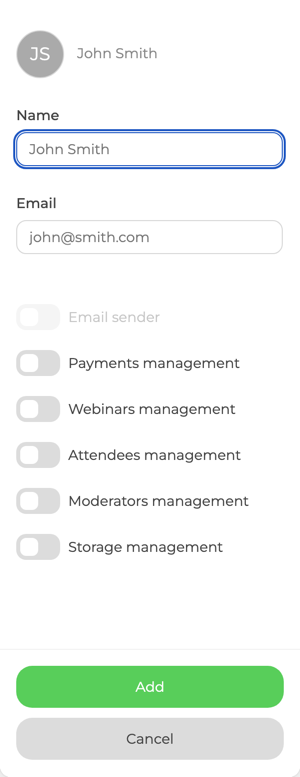
"Email sender" behaves differently from the other five. Once one sub-user holds it, the switch is greyed out on everybody else's form, and it stays that way until you take it off the person who has it.
So it is a single seat rather than a permission you spread around. Decide who is responsible for mailings before you hand it out, because moving it means editing two people instead of one.
A common reason people ask for this: the account is registered on one address while the person who should handle its mail reads another. Give that second address a sub-user of its own, hand it this switch, and the mailing side of the account sits with them.
What happens after you save
An invitation goes out to the address you entered. It carries a link that signs the person straight in, so you never set or send a password, and their username is that same email address.
The address is also the key to the record. Adding the same address a second time updates the existing person rather than creating a duplicate, which is worth knowing if you are tidying up a list and wondering why nothing new appeared.
Right after you save, the person appears in the list marked "waiting for confirmation", and that note clears once they follow the invitation.
Changing rights later
Open the person from the list and the same form comes back with their current switches. Turning one off takes the section away at once, so this is the quickest way to narrow access when somebody changes role, and it does not disturb any webinar they are already attached to as a moderator.
Frequently asked questions
How many sub-users can I add to my account?
As many as you need. There is no cap, and the number does not depend on your plan, so the free plan allows the same as the largest paid one. What your plan does limit is a different number, namely how many speakers can be on camera at the same time, which runs from two to twelve.
Do sub-users cost extra?
No. We charge for the room rather than for the people working in the account, so adding colleagues never changes your bill. That is the opposite of platforms that sell a licence or an organiser seat per person.
Is a sub-user the same as a moderator?
No, and they are set up in different places. A moderator belongs to a webinar, goes on air and takes a speaker slot; a sub-user belongs to the account and works in the control panel. One person can hold both, but adding somebody as a moderator gives them no access to the panel, and adding them as a sub-user puts them on no webinar.
Why is the "Email sender" switch greyed out?
Because another sub-user already holds it. Only one person on the account can send mail, so the switch stays inactive on every other form until you remove it from whoever has it now.
How does a sub-user sign in for the first time?
Through the invitation we email them when you save the form. It contains a link that signs them in directly, and from then on their username is the email address you entered. You do not set a password for them and there is nothing for you to pass on separately.
