
MyOwnConference as a ClickMeeting alternative, what is the difference?
ClickMeeting is the closest competitor to us in shape. Both are European, both are built for webinars rather than meetings, and both price by room size. So the differences are narrower than with Zoom, and they sit in two specific places, which are what it costs to automate and what happens before you pay anything.
Checked against ClickMeeting's own pricing page on 5 September 2026, in euros, on annual billing.
The short version
ClickMeeting is the better fit if you need certificates of attendance, a large integration catalogue, or a platform where nothing at all has to be installed. We are the better fit if you want to try the product properly before paying, if automated webinars are central to what you do, or if you cannot predict how long you will be on air.
Side by side
| MyOwn | ClickMeeting | |
|---|---|---|
| Free plan | Permanent, 5 attendees | None, a 14 day trial for 25 attendees |
| Entry paid plan | €33 a month for 60 attendees, €26.40 billed yearly | €31.92 a month for 50 attendees, billed yearly |
| Automated webinars | On every plan, including free | Only on the Automated plan at €42 |
| Extra people in your account | Unlimited, free, with per-area permissions | Live includes 3 additional logins |
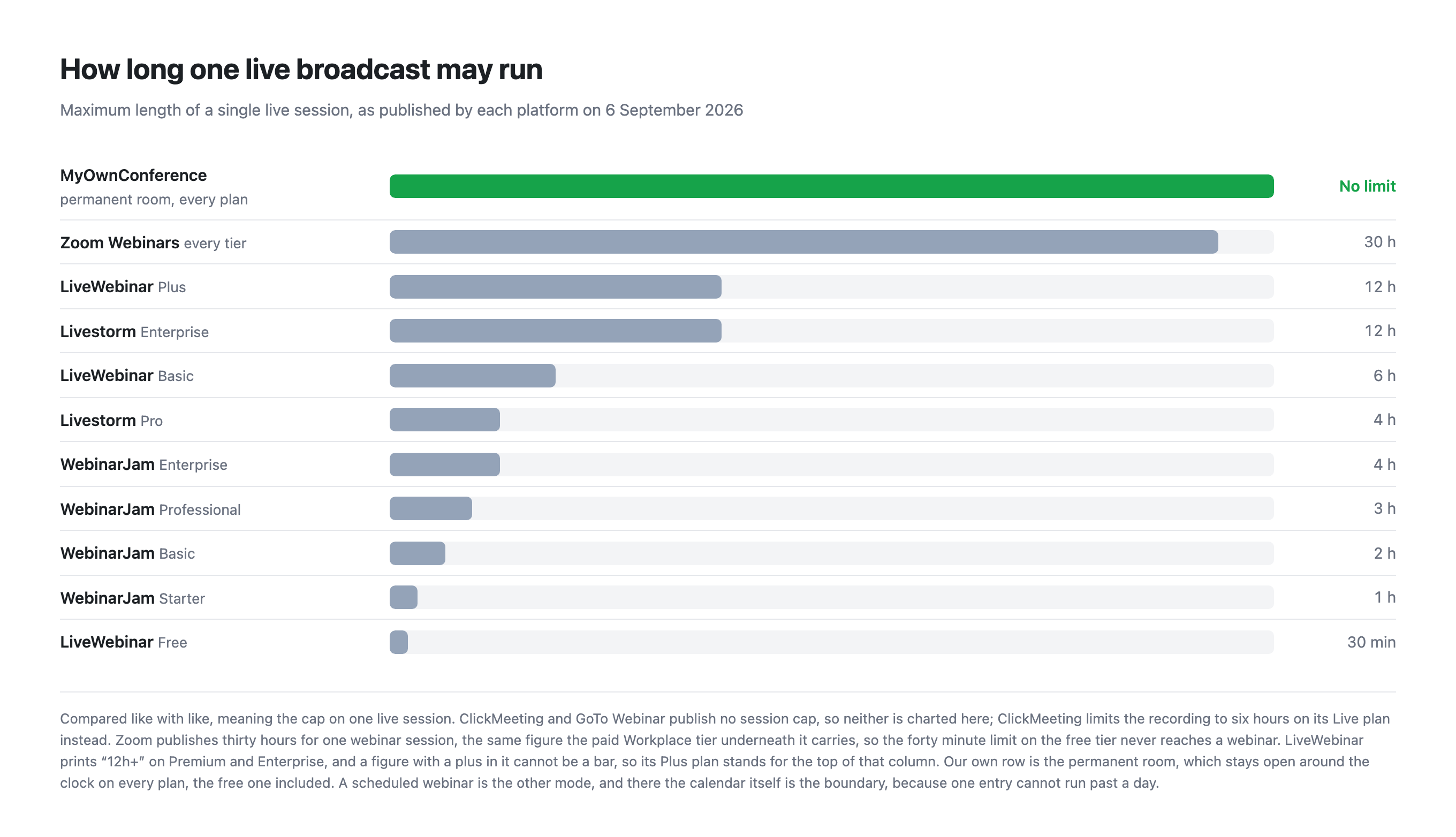
| Live broadcast length | Unlimited in a permanent room | Not capped, recording capped at 6 hours |
| Recording | 20 minutes free, 10 hours paid | Up to 6 hours on Live |
| Presenter installs anything | Only for screen sharing | No, nothing |
| Certificates of attendance | No | Yes, on Automated |
| Integrations | A public API on paid plans | More than 4,000 |
| AI features | None, by choice | Live and AI transcription |
| Buying it for one event | A single day from €11, bought on its own | Monthly or annual, in their own words |
| More people arrive than you paid for | Add 100 seats from inside the live room for €18, as often as you need, on every plan | They are told the seats are taken, and you move up a package |
What it costs to automate
This is the difference that matters most, because automated webinars are the reason many people leave a meetings tool in the first place.
On ClickMeeting, automation lives on a separate, dearer plan. Live is €31.92 a month for 50 attendees, and Automated is €42 for the same 50. If you want to record once and let a session run on a schedule, that is the plan you are on, and the automation premium is about €10 a month.
We include automated webinars everywhere. The free plan runs one a day, and every paid plan runs as many as you like. Our 60 attendee plan is €33 a month, or €26.40 billed yearly, and automation is already in it.
So for a business that automates, the comparison is €26.40 against €42 at a similar room size. For a business that never automates, the two are close enough that other things should decide it.
Trying it before paying
ClickMeeting gives you 14 days for 25 attendees and asks for no payment card. That is a generous trial, and it is a trial. On day 15 the account stops being useful unless you pay.
Our free plan is not a trial. It has 5 attendees rather than 25, which is a real limitation, but there is no clock on it. You can plan a webinar, run it, record 20 minutes of it, put a call to action banner in it and read the analytics afterwards, this month and next year, without paying.
Which of those is better depends on what you are testing. If you want to rehearse with a realistic audience for two weeks, ClickMeeting's trial is more useful. If you want to keep a small webinar habit running at no cost, or to keep the account around between occasional events, ours is.
There is one thing our free plan does that theirs does not, and it is fair to say it plainly. We put a watermark on the broadcast and on the recording, because the free plan is meant for non commercial use.
Where ClickMeeting is genuinely better
- Nothing to install, for anyone. Their pricing page says "No installation required", and as far as we can see that holds for screen sharing too. We ask presenters to install a small program of ours to share a screen, and it does not run on Linux. That is a real point against us.
- Certificates of attendance. Issued automatically on their Automated plan. We have no equivalent.
- Breakout rooms. On every one of their plans, the 14 day trial included. We have none at all.
- Integrations. More than 4,000 against our public API. If your stack expects a ready made connector, that gap is wide.
- AI transcription. They ship it, we do not, which is a deliberate choice on our side rather than a missing feature. We would rather not put a machine between a presenter and an audience, and real time transcription is still costlier and less accurate than working on the recording afterwards. If you need it today, they have it.
Where we are genuinely better
- A free plan that does not expire, running the same product as the paid ones rather than a cut down one, minus the paid extras.
- Automation at every price, instead of a dearer tier for it.
- No limit on how long you stay live, on any plan.
- A single day for €11, with no subscription, for 20 attendees.
- Higher recording ceiling than their Live plan, at 10 hours against 6, though their Automated plan records 10 as well.
- A firewall that blocks UDP does not cost you the webinar. Browsers carry live video over UDP, and corporate security rarely allows it. Alongside the browser route we run our own broadcasting protocol, which is not WebRTC, needs nothing beyond TCP port 443 in most cases, and switches on by itself in every room. The traffic goes down the path your firewall already keeps open, so there is no ticket to raise with IT. On a weak line the same transport can be taken over by hand with a downloadable plugin, and broadcasting from a corporate network explains both routes.
Which one to choose
Choose ClickMeeting if certificates matter to you, if you need a specific ready made integration, if you want a two week trial with a realistic audience, or if no one in your team can install anything at all.
Choose MyOwnConference if automated webinars are central to your plans, if you want an account that stays alive for free between events, if your sessions run long, or if you would rather pay for a single day than hold a subscription.
Frequently asked questions
Does ClickMeeting have a free plan, or only a trial?
Only a trial. ClickMeeting offers 14 days for up to 25 attendees with no payment card required, and after that the account needs a paid plan. Our free plan is smaller, at 5 attendees, but it does not expire and it runs the same product, minus the paid extras.
How much more does ClickMeeting charge for automated webinars?
About €10 a month at the same room size. Their Live plan is €31.92 a month billed annually for 50 attendees, and Automated is €42 for the same 50. With us automated webinars are on every plan, one a day on the free one and no limit on paid ones, so our 60 attendee plan at €26.40 billed yearly already includes them.
Which records for longer, ClickMeeting or MyOwnConference?
We do on paid plans, at 10 hours of continuous recording against ClickMeeting's 6 hours on Live. Our free plan is the weaker side of this, stopping at 20 minutes, which is shorter than anything ClickMeeting offers during its trial.
Does ClickMeeting need anything installed, and does MyOwnConference?
ClickMeeting's pricing page states that no installation is required. With us attendees never install anything either, but presenters install a small program of ours to share a screen, and that program does not run on Linux. On this specific point ClickMeeting is the simpler of the two.