
MyOwnConference as a Livestorm alternative, what is the difference?
Livestorm prices webinars in a way none of the others do. You do not buy a room size, you buy attendee credits and spend them as people turn up. That single decision changes how you budget, what a failed webinar costs you, and which kind of business the platform suits.
Checked against Livestorm's own pricing page on 1 September 2026, in euros.
The short version
Livestorm is the better fit if you want a polished, well designed product, if your audiences vary wildly from event to event, and if you would rather pay for the people who actually came. We are the better fit when you run webinars regularly, when a predictable monthly figure matters, or when video servers in the EU have to be included rather than purchased.
Two different ways to pay
| MyOwn | Livestorm | |
|---|---|---|
| Pricing model | Room size, a fixed monthly or yearly figure | €2.50 per unique attendee, bought as credits |
| Free plan | Permanent, 5 attendees | None, trial only |
| Extra people in your account | Unlimited, free, with per-area permissions | Unlimited team members, and they do not spend credits |
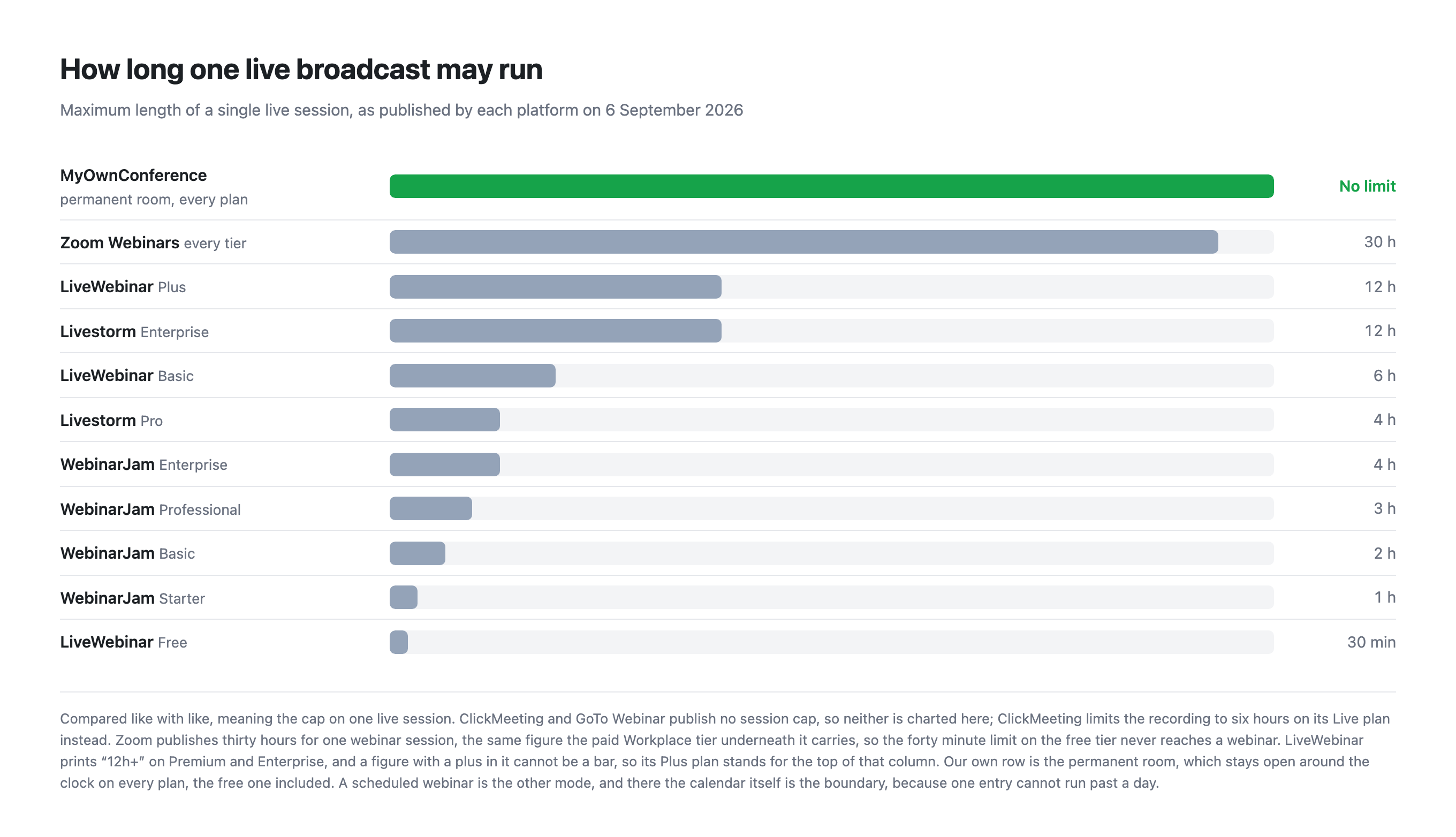
| One session may run for | No limit | 4 hours on Pro, 12 hours on Enterprise |
| Live video servers | European Union, fixed | Nearest server worldwide by default, a paid add-on to pin them to the EU |
| Automated webinars | Included on every plan | Replays and on-demand viewing, each spending a credit |
| Recording | 20 minutes free, 10 hours paid | Unlimited recording on Pro |
| AI features | None, by choice | AI Studio and live translation, both add-ons |
| Buying it for one event | A single day from €11, bought on its own | Attendee credits, sold as a yearly pack |
| More people arrive than you paid for | Add 100 seats from inside the live room for €18, as often as you need, on every plan | Once the credits are gone, nobody new gets in |
A credit is spent for each unique participant, per session, over a twelve month period, and team members are not counted.
Work the arithmetic through and the two models cross over. A single webinar with 400 attendees costs €1,000 in Livestorm credits. On our side, a 500 attendee plan is €110 a month, or €1,056 for a whole year, during which you may run as many webinars for as many people as the room holds.
So the crossover only exists against our annual plan. A single large event does not need a year here: a day for 400 seats is €55, against €1,000 in credits. That day leaves out OBS, paid tickets, recording links and a custom domain, so if the event needs any of them the month at €110 is the honest figure, and it is still a tenth of their pack. Their per-attendee shape only helps when turnout lands far below the room you would otherwise buy.
Where the video lives
This is the difference that matters for anyone with a data protection officer.
Livestorm sells "Video Hosting Region" as an add-on, described on their own page as a way to "choose a region (EU or USA) for video servers to comply with regulations". Putting the video servers in the EU is therefore a purchase decision rather than the default.
Our video servers are in the European Union and there is nothing to configure or buy. Their databases sit in Ireland whichever plan you are on, so the add-on is about the live leg rather than about storage. From our servers, video can reach attendees through global CDNs (Cloudflare, Bunny.net and Amazon CloudFront).
Time on air
Livestorm caps a session at four hours on Pro and twelve on Enterprise. For most webinars four hours is plenty. For an all day training course, a conference track or a marathon session, it is not, and the upgrade to Enterprise is a conversation with sales rather than a price on a page.
We do not cap session length on any plan.
One boundary is worth naming on our side, because it comes from the calendar rather than from the plan. A scheduled webinar is a single entry in a day, so it cannot be set to run past twenty-four hours. A permanent room carries no such boundary, because it sits on a link that never changes and stays open around the clock, on every plan including the free one. A session meant to run for days therefore belongs in a room rather than in the calendar.
Where Livestorm is genuinely better
- You pay for people who came. If half your registrants never show up, you keep the credits. Our model charges for the room whether it fills or not.
- Unlimited recording on Pro, where our free plan stops at 20 minutes.
- Unlimited team members, not counted against your credits. This is one of the few places where we are level, because we do not charge per person either, and you can add as many colleagues to the account as you like on any plan.
- Design and polish. Their product is widely regarded as one of the better looking and better organised in this category.
- AI features exist, as paid add-ons. We ship none, deliberately, because we do not want a machine standing in for a presenter and because real time transcription and translation are still expensive and weaker than post processing. If you want them now, they are available there.
Where we are genuinely better
- A permanent free plan, where they have only a trial.
- European hosting included, not sold separately.
- A permanent room runs without a time cap, and a scheduled webinar runs up to a day.
- Predictable cost for regular webinars, rather than a bill that scales with attendance.
- A single day for €11 for a one off event.
- A firewall that blocks UDP does not cost you the webinar. Browsers carry live video over UDP, and corporate security rarely allows it. Alongside the browser route we run our own broadcasting protocol, which is not WebRTC, needs nothing beyond TCP port 443 in most cases, and switches on by itself in every room. The traffic goes down the path your firewall already keeps open, so there is no ticket to raise with IT. On a weak line the same transport can be taken over by hand with a downloadable plugin, and broadcasting from a corporate network explains both routes.
Which one to choose
Choose Livestorm if you run a small number of large events, if attendance is unpredictable and you want to pay only for arrivals, if you need unlimited recording, or if presentation polish is a priority.
Choose MyOwnConference if you run webinars regularly, if a fixed monthly figure is easier to justify than a variable one, if sessions may run past four hours, or if European hosting must be the default rather than an add-on.
Frequently asked questions
How do Livestorm attendee credits work?
You buy credits at €2.50 each and spend one for each unique participant, per session, across a twelve month period. Team members do not consume credits. It is a per person model rather than a per room one, so the bill follows attendance rather than capacity.
At what point does Livestorm cost more than a fixed monthly plan?
Roughly at the point where you run more than one large event a year. A single webinar with 400 attendees costs €1,000 in Livestorm credits, while our 500 attendee plan is €1,056 for a whole year of unlimited events. One annual conference favours Livestorm, a monthly webinar habit favours us.
Is European video hosting included with Livestorm or sold separately?
Sold separately. Their pricing page lists Video Hosting Region as an add-on, described as a way to choose an EU or United States region for video servers to comply with regulations. Our video servers are in the European Union with nothing to configure or buy, and from them video can reach attendees through global CDNs (Cloudflare, Bunny.net and Amazon CloudFront).
Does Livestorm charge for team members?
No. Livestorm states that team members are not counted against attendee credits, and the Pro plan includes unlimited team members. We do not bill per person either. Our plans are sized by the room, and the only headcount that moves with the price is the number of simultaneous speakers, which runs from two up to twelve.