
MyOwnConference as a LiveWebinar alternative, what is the difference?
LiveWebinar is the one competitor whose free plan looks like ours at first glance. Both give you five attendees and cost nothing. The resemblance ends at the second line of the specification, and the same pattern repeats on the paid plans, where a long list of capabilities is sold separately from the plan itself.
Checked against LiveWebinar's own pricing page on 5 September 2026, in euros, on annual billing. The session length row was re-read on 6 September.
The short version
LiveWebinar is the better fit if you need breakout rooms, closed captioning or a large catalogue of individually purchasable features, and you are comfortable assembling a plan from parts. We are the better fit if you want a plan whose price is the whole price, and if you need more than half an hour of free air time.
Two free plans that are not alike
Both free plans hold five attendees, and neither expires. Everything else differs.
| Free plan | MyOwn | LiveWebinar |
|---|---|---|
| Attendees | 5 | 5 |
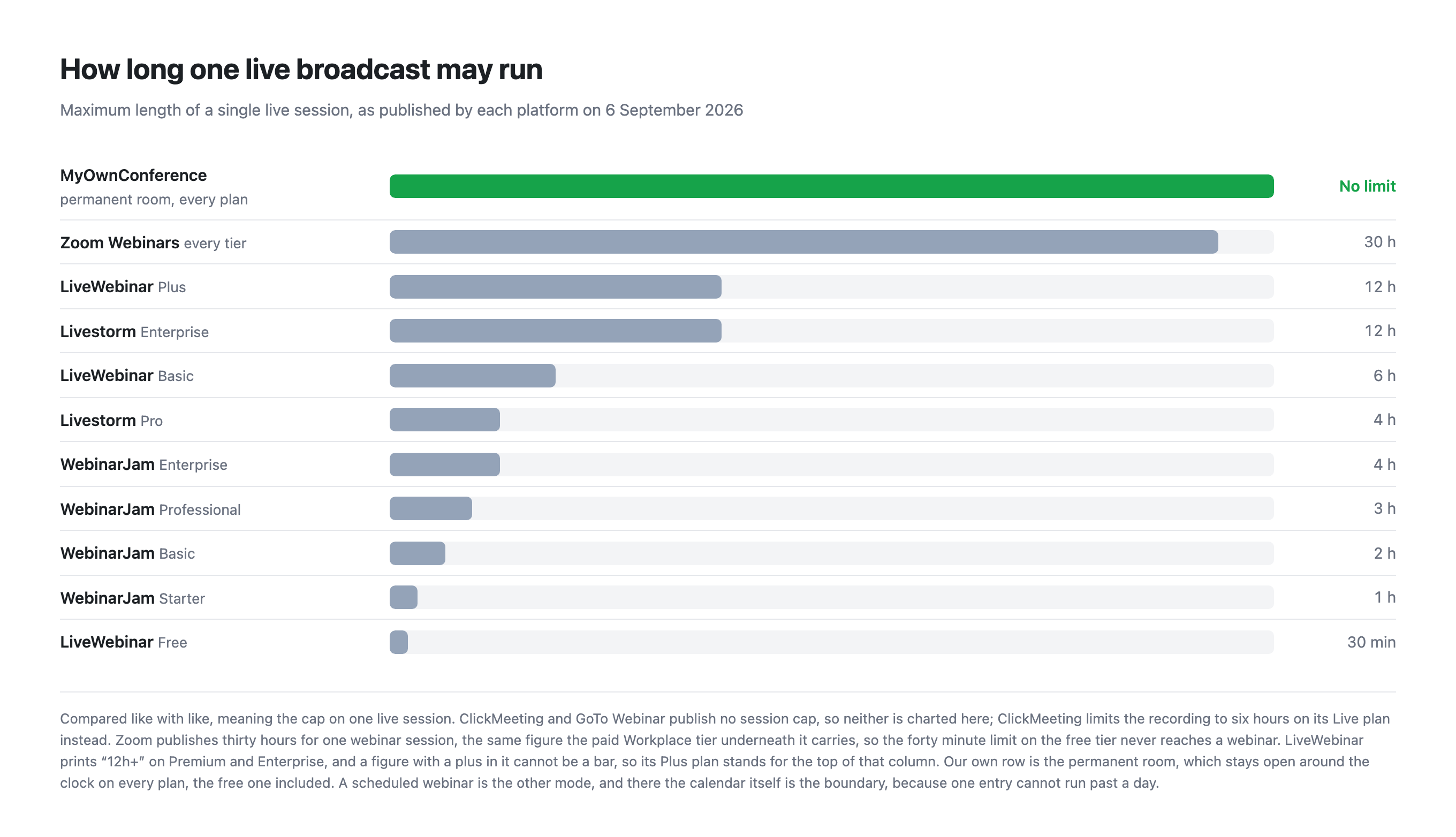
| One session may run for | Unlimited in a permanent room | 30 minutes |
| Recording | 20 minutes | None at all |
| Storage | 500 MB | 50 MB |
| Cameras on at once | 2 | 5 |
| Extra people in your account | Unlimited, free, with per-area permissions | 1 profile free, 5 on Basic |
| Support language | English, Polish, Russian and Ukrainian | English only |
| Buying it for one event | A single day from €11, bought on its own | Monthly or annual, and the add-ons are monthly too |
| More people arrive than you paid for | Add 100 seats from inside the live room for €18, as often as you need, on every plan | They meet a full room, and capacity is an add-on bought in the panel |
A half hour ceiling changes what the free plan is for. It is enough to demonstrate the product and not enough to hold a webinar, so a real session has to be paid for. Ours will carry an actual event, at a small size and with a watermark on it.
What the paid plan includes, and what it does not
LiveWebinar Basic is €24 a month billed annually for 25 attendees, which is less than our €33 for 60, or €26.40 billed yearly. On the headline number they are cheaper.
The list of what Basic marks as "as an add-on" is where the comparison turns. On their own pricing table, twelve rows carry that label at the Basic level: social media live streaming, webinar invitation templates, webinar landing pages, certificates, source tracking, a friendly URL, recurring webinars, breakout rooms, closed captioning, engagement, form appearance and the recording editor.
Two neighbouring rows are worth reading carefully, and one of them corrects an earlier version of this page. Paid webinars are included on Basic rather than sold on top. Automated webinars are not an add-on either, they are absent from Basic altogether and start on Plus, at five a month.
Three of the twelve we do not have at all, and it would be wrong to pretend otherwise: certificates, breakout rooms and closed captioning. Landing pages and invitations are in our price on every plan including the free one, a custom domain comes with any paid plan, and automated webinars run on every plan of ours, one a day even on the free one.
Session length on Basic is capped at six hours, and recording at one hour. Ours has no session cap and records for ten hours on paid plans.
So the honest comparison is not €24 against €26.40. It is €24 plus whichever add-ons you actually need, against €26.40 with the ones we do have already in it. Which is cheaper depends entirely on your list.
Where LiveWebinar is genuinely better
- Breadth of features. Breakout rooms, closed captioning, chat translation, agenda creator, presence manager, several video players and a long tail of tools we simply do not have.
- A la carte pricing. If you need exactly one of those extras, buying it alone may cost less than moving up a plan.
- Nothing to install for screen sharing, as far as their materials indicate, where we ask presenters for a small program.
- More cameras on the free plan, at five against our two speakers.
Where we are genuinely better
- A permanent room runs without a time cap, on any plan, against 30 minutes free, 6 hours on Basic and 12 on Plus, and a scheduled webinar runs up to a day.
- The free plan records. Twenty minutes of it, against none.
- Automation, landing pages and lead capture are in the price, not bolted on.
- Ten hours of recording on paid plans against one hour on Basic.
- A single day for €11 with no subscription.
- A firewall that blocks UDP does not cost you the webinar. Browsers carry live video over UDP, and corporate security rarely allows it. Alongside the browser route we run our own broadcasting protocol, which is not WebRTC, needs nothing beyond TCP port 443 in most cases, and switches on by itself in every room. The traffic goes down the path your firewall already keeps open, so there is no ticket to raise with IT. On a weak line the same transport can be taken over by hand with a downloadable plugin, and broadcasting from a corporate network explains both routes.
Which one to choose
Choose LiveWebinar if you need breakout rooms or captioning, if your requirements are unusual enough that buying features individually works out cheaper, or if no one on your team can install anything.
Choose MyOwnConference if you want the plan price to be the final price, if your sessions run long, if you need automated webinars without a surcharge, or if you want a free plan that can carry a small real event rather than a demonstration.
Frequently asked questions
LiveWebinar and MyOwnConference both give five attendees free, so what actually differs?
The limits around those five seats. LiveWebinar caps a free session at 30 minutes and offers no recording at all, while ours has no time limit on the broadcast and records up to 20 minutes. Ours also gives 500 MB of storage against their 50 MB. Theirs, in turn, carries five cameras against our two.
Which LiveWebinar Basic features are sold as add-ons rather than included?
Twelve. Their own pricing table marks these as add-ons at the Basic level: social media live streaming, webinar invitation templates, webinar landing pages, certificates, source tracking, a friendly URL, recurring webinars, breakout rooms, closed captioning, engagement, form appearance and the recording editor. Paid webinars are included on Basic rather than sold on top, and automated webinars are not an add-on either, they are absent from Basic altogether. Of the twelve we have no certificates, no breakout rooms and no closed captioning at all.
How long can a LiveWebinar session run?
Thirty minutes on the free plan, six hours on Basic and twelve on Plus, with Premium and Enterprise printed as twelve hours and more. No plan of ours puts a clock on the broadcast, the free one included. The limit we do apply falls on the saved file instead, which stops at 20 minutes without payment and at 10 hours with it.
How much recording does LiveWebinar Basic include?
One hour, alongside 100 MB of storage. Our comparable paid plans record for up to 10 hours and start at 2 GB of storage, rising to 100 GB on the larger ones.