
MyOwnConference as a Zoom alternative, what is the difference?
Zoom is the tool most people already have open. That makes it the obvious first thought for a webinar, and it is also why the comparison is easy to get wrong. Zoom is a meetings product, and its webinar capability is a separate paid licence that sits on top of a paid meetings licence. That one structural fact drives most of what follows.
Everything below was checked against Zoom's own pricing pages and support documentation on 1 September 2026, in euros, and against our own plan data. The broadcast length row was re-read on 6 September and the published webinar tiers on 4 October. Prices move, so treat the figures as a snapshot and check both sides before you commit.
The short version
Zoom is the better fit when your organisation already runs on Zoom and a webinar is an occasional broadcast to a large audience. We are the better fit when the webinar itself is the job, when you want to start without a card, and when you cannot predict how long you will be on air.
Side by side
| MyOwn | Zoom Webinars | |
|---|---|---|
| What you buy | One plan, priced by room size | A webinar licence plus a paid Workplace licence underneath |
| Entry price for 500 attendees | €110 monthly, or €88 a month billed yearly | €76.67 a month billed yearly, plus €13.33 for Workplace Pro |
| Free plan | Yes, permanent, 5 attendees | No free tier for webinars |
| Extra people in your account | Unlimited, free, with per-area permissions | Each one needs their own paid Workplace licence at €13.33 |
| Live broadcast length | Unlimited in a permanent room | 30 hours a broadcast |
| Attendee joins in a browser | Always, nothing to install | Yes, on by default, though an admin can switch it off |
| Automated webinars | On every plan, one a day on the free one | Available on the higher webinar tiers |
| Where the data sits | European Union | Not stated on the pricing page |
| AI features | None, by choice | Extensive |
| Buying it for one event | A single day from €11, bought on its own | Pay per attendee exists, but only on top of a paid licence |
| More people arrive than you paid for | Add 100 seats from inside the live room for €18, as often as you need, on every plan | They wait for somebody to leave, and more room is a change of plan |
What you are actually buying
This is the part that surprises people. On Zoom's own pricing page every webinar tier carries the footnote "Zoom Workplace Pro Required". The webinar licence is an add-on, so the real monthly figure is the two lines together.
At 500 attendees that works out at roughly €90 a month for Zoom, against €88 a month for us on a yearly plan. So the honest answer to "which is cheaper" at that size is neither, they are within a couple of euros of each other. Anyone who tells you there is a large gap at that capacity has not added the second line.
The gap opens in two places instead. Zoom's smallest webinar tier (Webinars Plus) holds 100 seats while ours start at 20, so an audience of thirty pays Zoom for capacity it will never use. And Zoom prices per user licence, so a second person who needs to schedule webinars means a second Workplace licence, while our plans are priced per account.
Who is allowed to run the account
Zoom sells licences per person. Workplace Pro is €13.33 per user a month, and the webinar licence sits on top of a paid one, so the second colleague who needs to schedule and run a webinar is not a setting you switch on. It is another licence.
We do not charge for people at all. Your profile carries a "Users" tab, and you can add as many colleagues to the account as you want, on any plan including the free one, without paying for a single one of them. Each gets their own login and only the rights you tick, because webinars, attendees, moderators, storage, mailings and payments are separate permissions rather than one all or nothing key. Somebody who only sends invitations never sees your card details.
Our plans do limit one number, and it is a different one. Speakers on camera at the same time run from two on the smaller plans to twelve on the larger ones. A team of six can all hold their own logins and take turns on air, while how many of them appear together on screen is what the plan decides. How the switches work and where the section lives is set out in sub-user accounts.
Time on air
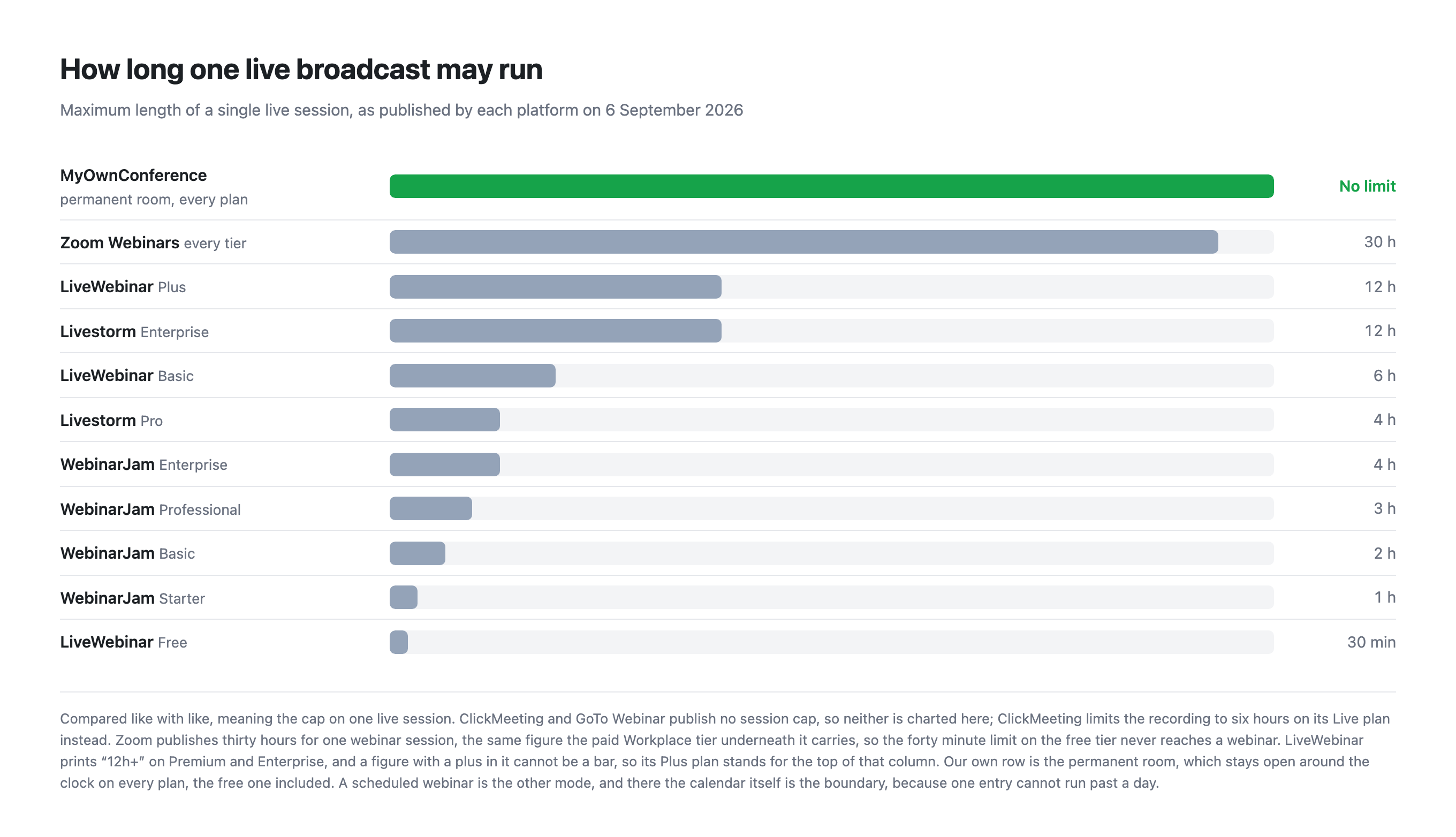
Our plans do not cap how long a live broadcast runs. Not the paid ones, and not the free one either. What we do cap is the recording, at 20 minutes on the free plan and 10 hours on paid plans, because storage and encoding cost us money while an open connection does not.
One boundary is worth naming on our side, because it comes from the calendar rather than from the plan. A scheduled webinar is a single entry in a day, so it cannot be set to run past twenty-four hours. A permanent room carries no such boundary, because it sits on a link that never changes and stays open around the clock, on every plan including the free one. A session meant to run for days therefore belongs in a room rather than in the calendar.
Zoom publishes thirty hours for a single webinar session, and the paid Workplace tier a webinar licence requires carries the same figure. The forty minute cap belongs to the free tier, which a webinar never runs on, so it is a limit you meet while trying Workplace itself rather than one that shortens a broadcast.
Joining without installing anything
Plenty of comparison pages claim that Zoom forces attendees to install the app. That is not what Zoom's own documentation says. The "Join from your browser" link setting is enabled by default, so attendees can join in a browser.
There are two real caveats, and they are worth knowing rather than exaggerating. An account owner or admin can switch the browser link off, and it does not appear at all when end to end encryption is enabled, in which case people are pushed to the app.
On our side the attendee experience is simpler because there is nothing to switch off. A link opens the room in Safari, Chrome, Edge, Firefox or Opera, and no account is needed.
There is one thing we do ask presenters to install, and it is better said here than discovered later. Screen sharing goes through a small program of ours, on Windows and macOS, and it is not available on Linux at all. Everything else a presenter does, including camera, microphone, slides, polls and the whiteboard, runs in the browser. Why screen sharing requires our software explains the reasoning.
Where Zoom is genuinely better
- AI. Zoom ships meeting summaries, AI note taking and a great deal more. We ship none of it, and that is a decision rather than a gap. We are not interested in replacing a live presenter with a machine, and real time transcription and translation are still expensive and noticeably worse than processing a recording afterwards. We are watching the field and collecting ideas for integrations that would earn their place. Today, if you need AI summaries, Zoom has them and we do not.
- Scale. Zoom's published webinar tiers run to 5,000, with 10,000 and more on request, and Zoom Events reaches further still. We stop at 5,000.
- Ecosystem. If your calendar, your phone system and your chat are already Zoom, a webinar inside that estate is one less integration to think about.
- Recognition. Attendees know what a Zoom link is. That familiarity has real value.
Where we are genuinely better
- Starting costs nothing and stays free. Five attendees, two speakers, live time capped only by the day, and no payment card. Zoom has no free webinar tier.
- The tools you present with are all on the free plan. Polls, tests, chat moderation, the whiteboard, call to action banners, landing pages, branding and the full analytics set are all there. What changes with price is scale, meaning room size, recording length and storage, plus the paid extras, meaning selling seats, OBS and RTMP streaming, recording share links, the public API and a custom domain.
- A single day costs €11. If you run one webinar a quarter, a 24 hour pass for 20 attendees is a fairer shape than a monthly licence you keep paying for.
- Servers in the European Union. Our servers are EU based rather than an option you configure. Video can reach attendees through global CDNs (Cloudflare, Bunny.net and Amazon CloudFront).
- A firewall that blocks UDP does not cost you the webinar. Browsers carry live video over UDP, and corporate security rarely allows it. Alongside the browser route we run our own broadcasting protocol, which is not WebRTC, needs nothing beyond TCP port 443 in most cases, and switches on by itself in every room. The traffic goes down the path your firewall already keeps open, so there is no ticket to raise with IT. On a weak line the same transport can be taken over by hand with a downloadable plugin, and broadcasting from a corporate network explains both routes.
Which one to choose
Choose Zoom if your company already runs on it, if you need AI summaries or transcription, if your audience is far larger than 5,000, or if a large enterprise agreement makes the add-on structure irrelevant to you.
Choose MyOwnConference if you want to start without a card, if your audience is under a few thousand, if you cannot predict how long you will stay on air, if you run occasional events and would rather pay by the day, or if EU data residency has to be a default rather than a setting.
Frequently asked questions
Do I need a paid Zoom plan before I can buy Zoom Webinars?
Yes. Zoom's pricing page marks every webinar tier with "Zoom Workplace Pro Required", so the webinar licence is bought on top of a paid Workplace licence. Budget for both lines rather than the webinar figure alone.
Is MyOwnConference cheaper than Zoom Webinars at 500 attendees?
No. At that size the two are within a couple of euros of each other, at roughly €90 a month for Zoom once the required Workplace Pro licence is counted, against €88 a month for us on a yearly plan. We are cheaper below 100 attendees, because our plans start at 20 while Zoom's smallest webinar tier (Webinars Plus) is 100, and cheaper for occasional events, where a single day costs €11.
Can attendees join a Zoom webinar in a browser without installing the app?
Usually yes. Zoom's documentation states that the "Join from your browser" link setting is enabled by default. Two things switch it off, which are an administrator disabling it and end to end encryption being turned on, and in both cases attendees are pushed to the app. With us the attendee always joins in a browser and no account is needed.
Does MyOwnConference have the AI summaries and transcripts that Zoom offers?
No, and that is a decision rather than a gap. We are not interested in putting a machine between a presenter and an audience, and real time transcription and translation are still expensive and noticeably weaker than processing a recording afterwards. We are watching the field and collecting ideas for integrations that would earn their place. If you need AI summaries today, Zoom has them and we do not.