
MyOwnConference as a WebinarJam alternative, what is the difference?
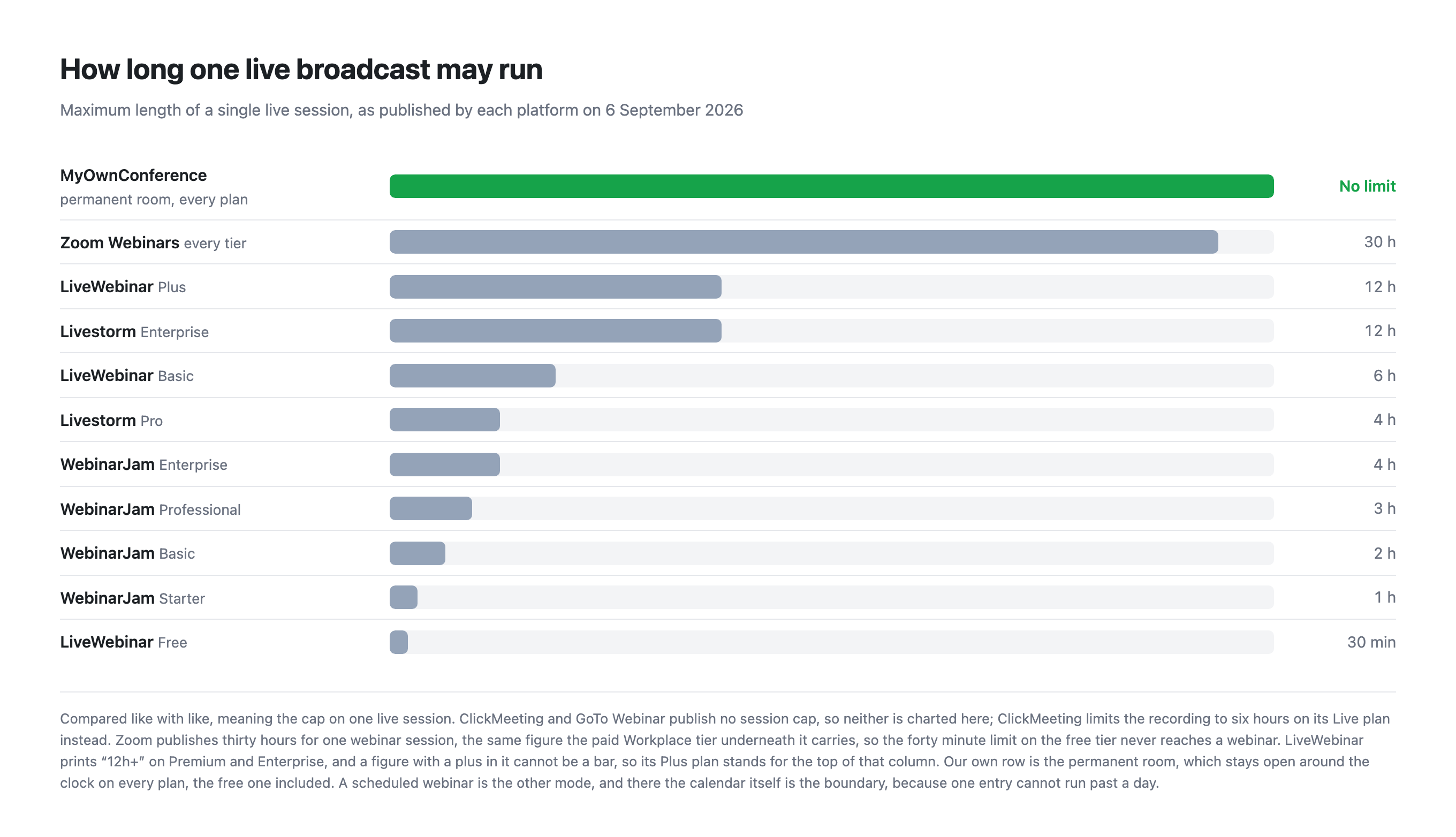
WebinarJam is built for one job, which is selling from a webinar, and it is unusually direct about it. The comparison with us turns on something you will not find in most feature lists, which is that WebinarJam decides how long your webinar may last according to which plan you bought.
Checked against WebinarJam's own pricing page on 5 September 2026. Their prices are in United States dollars, ours in euros, so the two are not directly comparable without a conversion on the day.
The short version
WebinarJam is the better fit if your webinar is a sales funnel and you want the funnel tooling in one box. We are the better fit if your sessions are long, if you want to start without paying, or if you are in Europe and would rather be billed in euros by a European company.
Side by side
| MyOwn | WebinarJam | |
|---|---|---|
| Live webinar length | Unlimited in a permanent room | 1 hour on Starter, rising to 4 hours on Enterprise |
| Free plan | Permanent, 5 attendees | None, but a $1 trial for 14 days and a 30 day money back guarantee |
| Extra people in your account | Unlimited, free, with per-area permissions | 1 host on Starter, rising to 6 on Enterprise |
| Entry price | €22 a month for 20 attendees | $49 a month, or $39 billed yearly, for 100 |
| Speakers on camera at once | 2 on the free plan, up to 12 on paid ones | 1 host on Starter, up to 6 on Enterprise |
| Automated webinars | Included on every plan | EverWebinar, included from Basic upward |
| Currency and billing | Euros, EU company | US dollars |
| Where the data sits | European Union | Not stated on the pricing page |
| Recording | 20 minutes free, 10 hours paid | Included |
| Buying it for one event | A single day from €11, bought on its own | Monthly or annual only |
| More people arrive than you paid for | Add 100 seats from inside the live room for €18, as often as you need, on every plan | Growing the room means writing to their billing team |
The limit worth knowing about
WebinarJam sets a maximum duration for a single webinar and ties it to the plan.
| WebinarJam plan | Price billed yearly | Attendees | Maximum webinar length |
|---|---|---|---|
| Starter | $39 a month | 100 | 1 hour |
| Basic | $79 a month | 500 | 2 hours |
| Professional | $229 a month | 2,000 | 3 hours |
| Enterprise | $379 a month | 5,000 | 4 hours |
An hour is a workable length for a sales webinar with a pitch at the end, which is exactly what Starter is designed for. It is not a workable length for training, onboarding, a class or a conference session with questions afterwards.
We do not cap the length of a live broadcast on any plan, including the free one. A scheduled webinar is one entry in a day, so twenty-four hours is its outer edge, while a permanent room stays open around the clock on every plan. The only duration limit we apply is on the recording, at 20 minutes free and 10 hours paid, because storage and encoding cost us money while an open connection does not.
Hosts come bundled with capacity
WebinarJam counts hosts by plan, and the count is welded to the attendee number. Starter gives one host and 100 attendees. To reach four hosts you buy Professional at $229 a month billed annually, which also brings 2,000 attendees whether you need them or not. Their pricing page offers no way to buy a host without buying the capacity attached to it.
We separate the two. Adding colleagues to the account is free and unlimited on every plan, each with their own login and their own set of permissions, and the plan decides only how many speakers appear on camera at the same time, from two on the smaller plans to twelve on the larger ones.
So a team of four that speaks to audiences of eighty pays us €49.50 a month for a room of 100. All four hold their own logins and all four fit on camera together, because that plan carries ten speaker slots. On WebinarJam the same team is looking at the plan that carries four hosts. How the switches work and where the section lives is set out in sub-user accounts.
Trying before buying
WebinarJam has no free plan. What it has is a 30 day money back guarantee, which means you pay first and ask for the money back if it does not suit you. Their pricing page also sells a 14 day trial of a 500 attendee room for $1, so the barrier to trying it is a dollar rather than nothing.
Our free plan asks for no payment card at all. It is small, at five attendees, and it puts a watermark on the broadcast and the recording, but it does not expire and it is the same product, minus the paid extras.
Where WebinarJam is genuinely better
- Funnel tooling in one box. Built in offers, A/B split testing on registration pages, email and SMS reminders, and a live chat simulator for automated sessions. We have call to action banners and landing pages, but not the full apparatus.
- EverWebinar is a mature, well known automated webinar product, bundled from Basic upward.
- Attendee numbers per dollar are generous at the upper tiers, at 5,000 attendees on Enterprise.
- SMS reminders. We send email and Telegram invitations, and no SMS.
Where we are genuinely better
- A permanent room runs without a time cap. This is the largest single difference between us, and a scheduled webinar still runs up to a day.
- A free plan that never expires, against a refund window.
- Smaller entry point. Our plans start at 20 attendees for €22, where their smallest is 100 seats.
- Euro billing from a European company, with data in the European Union.
- A single day for €11, with no subscription at all.
- More speakers on camera at the low end, at two on our free plan against one host on Starter.
- A firewall that blocks UDP does not cost you the webinar. Browsers carry live video over UDP, and corporate security rarely allows it. Alongside the browser route we run our own broadcasting protocol, which is not WebRTC, needs nothing beyond TCP port 443 in most cases, and switches on by itself in every room. The traffic goes down the path your firewall already keeps open, so there is no ticket to raise with IT. On a weak line the same transport can be taken over by hand with a downloadable plugin, and broadcasting from a corporate network explains both routes.
Which one to choose
Choose WebinarJam if your webinar exists to sell something, if you want split testing and SMS reminders without assembling them yourself, or if EverWebinar specifically is what you are after.
Choose MyOwnConference if your sessions run longer than an hour, if you want to test the platform without paying first, if your audience is smaller than a hundred, or if euro billing and EU hosting matter to your organisation.
Frequently asked questions
How long can a WebinarJam webinar run on each plan?
One hour on Starter, two on Basic, three on Professional and four on Enterprise. The cap rises with the price of the plan. We do not limit the length of a live broadcast on any plan, including the free one. A scheduled webinar is one entry in a day, so twenty-four hours is its outer edge, while a permanent room stays open around the clock. We and only cap the recording, at 20 minutes free and 10 hours paid.
Is EverWebinar included with WebinarJam?
From the Basic plan upward. Starter does not include it, so the cheapest WebinarJam plan runs live webinars only. We include automated webinars on every plan, with one a day on the free plan and no limit on paid ones.
Does WebinarJam offer a free plan or a money back guarantee?
A guarantee rather than a free plan. They advertise 30 days risk free, which means you pay first and request a refund if the platform does not suit you. Our free plan asks for no payment card at all and does not expire, though it does put a watermark on the broadcast and the recording. Their pricing page also sells a 14 day trial of a 500 attendee room for $1, so the barrier to trying it is a dollar rather than nothing.
How many hosts does each WebinarJam plan include?
One on Starter, two on Basic, four on Professional and six on Enterprise. Our free plan already allows two speakers on camera at once, and paid plans go from two up to twelve depending on room size.