
Why your speed to EU servers is slower than Speedtest
Speedtest reports 290 Mbps. Your real speed when working with servers in the EU comes out closer to 38 Mbps. A gap of roughly eight times is hard to ignore, and it almost always traces back to the long international route rather than to your equipment or to our service.
The short version
Speedtest and a real connection to a distant server measure different things. Speedtest checks the raw capacity of your local line over a very short route. Real work with EU servers depends on latency and on the state of the international links your traffic crosses. So a high Speedtest result tells you your line is healthy, while low speed to the EU comes down to the physics of long-distance connections and the load on transit networks.
What the gap looks like
Here is one line measured twice, minutes apart. Speedtest first, against a server it chose itself:
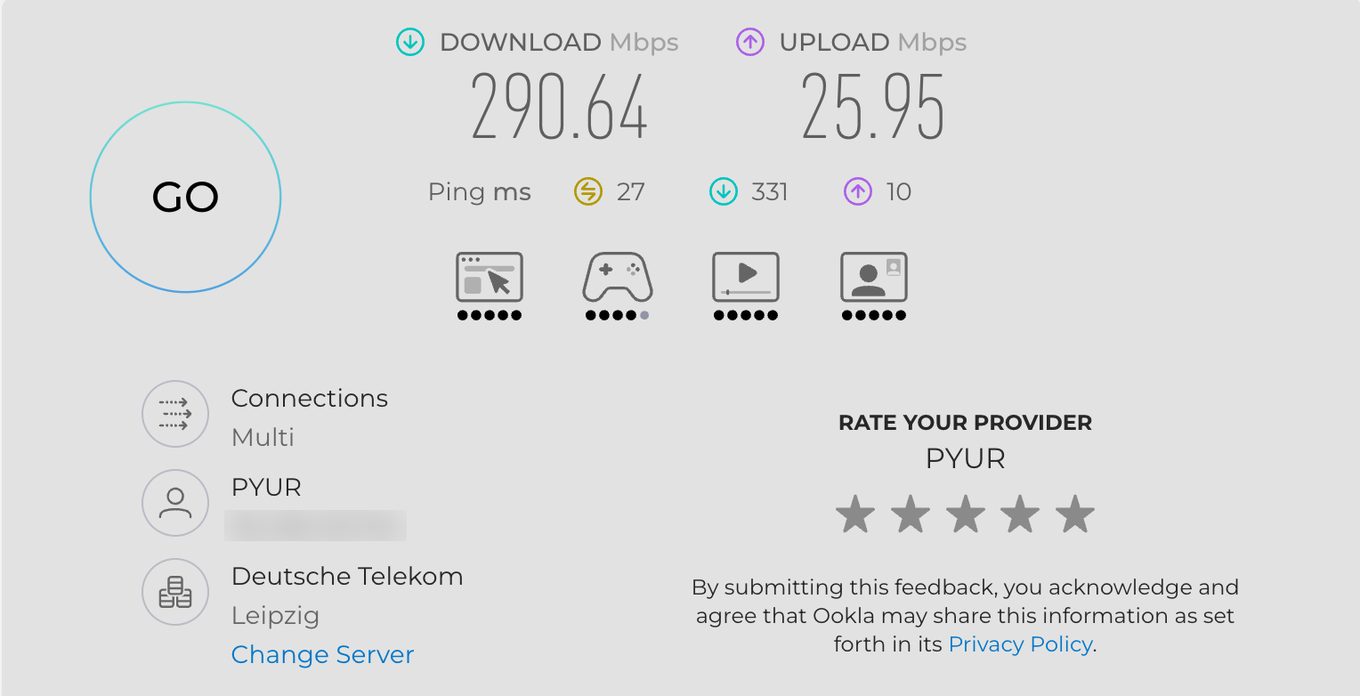
Two details in that panel explain most of the number. "Connections" reads "Multi", so the figure is several streams added together, and the chosen server sits in the same country. Now the same line measured against the servers that actually carry webinars, on the "Speed" step of our own connection tester:
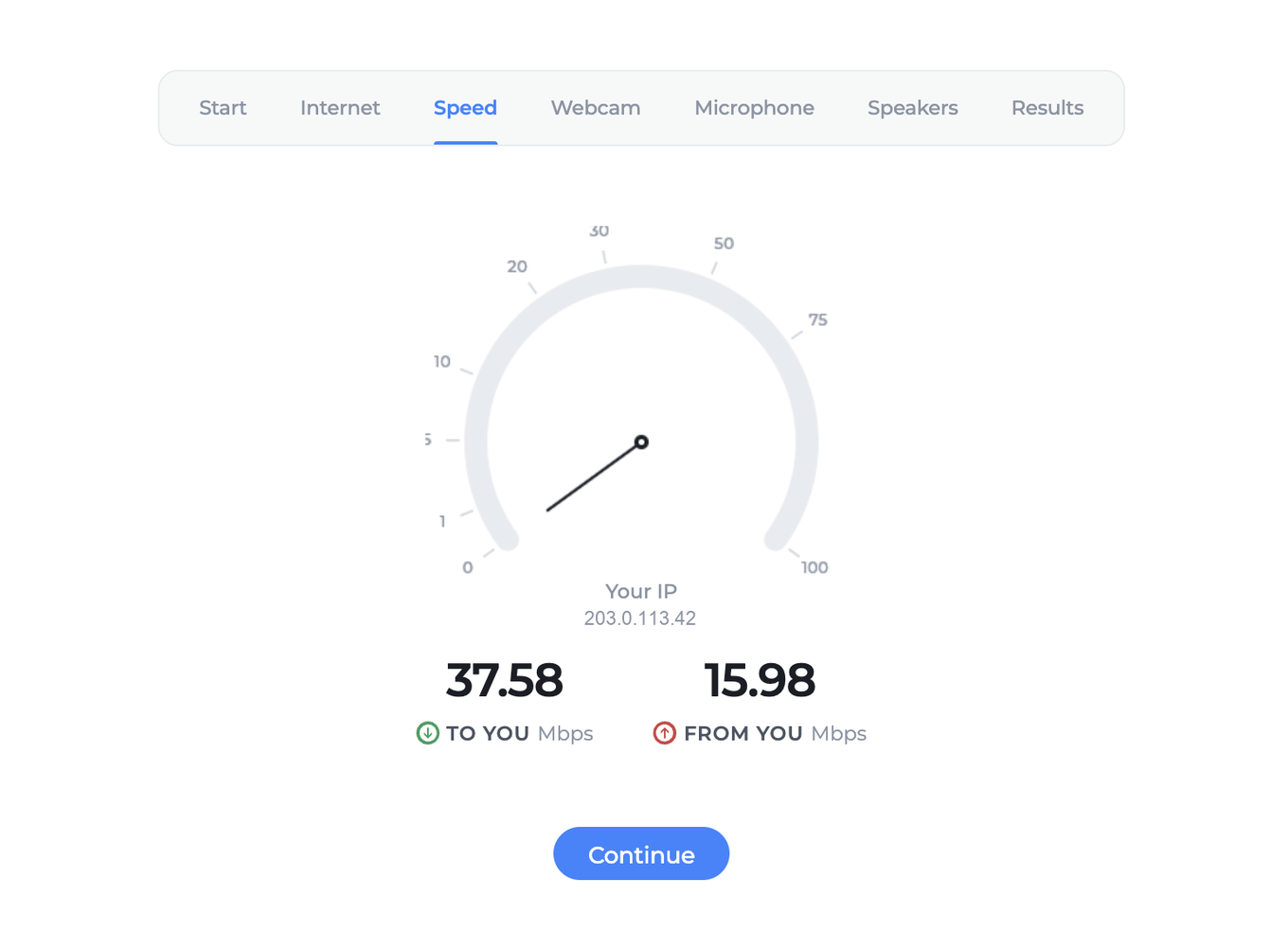
Download falls by roughly eight times, while upload slides only from 26 to 16, a far gentler drop. Neither figure means the line is faulty, and the rest of this article explains where each one goes.
One thing to read carefully in the second panel. "TO YOU" is what you receive, and "FROM YOU" is what you send. If you are the one presenting, "FROM YOU" is the number that matters, because your camera, your microphone and your screen all travel upstream. An attendee who only watches depends on "TO YOU" instead. In the measurement above, 15.98 Mbps upstream is roughly ten times what a presenter needs.
What Speedtest actually measures
Speedtest is built to show the highest number it can, so its result only partly reflects real work with distant servers.
- It picks the nearest server. Speedtest selects whichever server has the lowest latency, usually one inside your provider's own network or in the same city. Traffic to it travels a short route and never touches international links.
- It opens many parallel connections. Speedtest runs several TCP streams at once, typically 4 to 16, and adds up their speed. That sidesteps the limit a single connection runs into on long routes, which the next section explains. Real applications often work over one connection or two, so they never get that boost.
- Latency is minimal. On a short route the round trip, known as RTT, is only a few milliseconds, so TCP has time to ramp up to the full speed of the line.
Speedtest therefore shows the laboratory throughput of your line. It does not show what you will get when exchanging data with a server in another country.
Bandwidth-delay product and the TCP window
Most of the gap comes down to this one mechanism.
TCP sends data in windows. The sender pushes out a chunk of data, then waits for confirmation that it arrived before continuing. The maximum speed of a single TCP connection follows a simple formula:
Speed = Window size / Latency (RTT)
To fill the line completely, the window has to be at least as large as the bandwidth-delay product, or BDP:
BDP = Bandwidth × RTT
Run the numbers for that 290 Mbps line with a latency to an EU server of around 50 ms:
BDP = 290,000,000 bit/s × 0.05 s = 14,500,000 bits = 1.81 MB
So roughly 1.8 MB of data has to be in flight at any moment for the line to be saturated. If one side is stuck with a limited window size, meaning the classic 64 KB without window scaling, the ceiling for a single connection works out to:
Speed = 65,536 bytes × 8 bit / 0.05 s ≈ 10.5 Mbps
That is why a single connection to a distant server tops out at 10 to 20 Mbps even when the line itself is rated for hundreds of megabits. On a short route with an RTT of 2 ms the same window would deliver over 260 Mbps, which is why the problem never shows up in Speedtest. The higher the latency, the stronger the effect. Nothing is broken here, because this is simply how the protocol behaves.
Latency and the physics of long links
Latency on a long route is made up of several parts, and some of them cannot be removed at all.
Light travels through optical fibre at roughly 200,000 km/s, noticeably slower than the speed of light in a vacuum because of the refractive index of glass. Every thousand kilometres of route adds about 5 ms one way, so about 10 ms for the round trip. Real routes rarely run in a straight line either, so they are usually longer than the geographic distance.
Then there is the delay at every intermediate node. Each router processes the packet, queues it and forwards it on. On the way to an EU server there are typically 10 to 20 such nodes, called hops, and each one adds its share. The higher the resulting RTT, the lower the ceiling on a single connection by the formula above.
Packet loss and its effect on TCP
Even small amounts of packet loss on an international link cut the resulting speed sharply. TCP reads a lost packet as a sign of congestion, so it slows down and then builds the speed back up again. The relationship is captured by the Mathis equation:
Speed ≈ MSS / (RTT × √p)
MSS is the maximum segment size, usually around 1460 bytes, RTT is the latency, and p is the fraction of packets lost. Speed falls inversely with the square root of the loss rate, and it depends directly on latency.
In practice the numbers look dramatic. At an RTT of 50 ms with a standard MSS, even 0.1 percent loss limits a single connection to about 7 Mbps. One percent loss brings it down to roughly 2.3 Mbps, and 2 percent drops it below 1.7 Mbps. On long transit routes, loss of 1 to 2 percent during peak hours is entirely normal, and wherever it reaches those levels it bites harder than the window limit above, which is why a route that looks merely slow in the morning can become unusable in the evening.
Routing and peering
The path your traffic takes to an EU server is not direct. It runs through a chain of operators and the BGP routing protocol, which picks a route on commercial and technical grounds rather than by shortest distance.
Several typical problems follow from that. A route may run through a third country when a shorter path exists, which raises both the latency and the risk of loss. Traffic also crosses the junctions between networks, meaning peering points and transit links. A congested junction is exactly where speed drops. Asymmetric routing is common too, with packets going out and coming back by different paths, which makes any diagnosis harder to read. International capacity is also bought rather than given, so a provider that has bought sparingly runs short of it at the peak.
Congestion on your provider's international links
Local traffic, within the city and within the country, has plenty of spare capacity at most providers. That is why Speedtest to a nearby server always shows a high number. International links are more expensive and are bought in limited volume, and during the evening peak they become the bottleneck. It explains why speed to the EU can swing noticeably over the course of a day while local Speedtest stays consistently high.
Other technical factors
Beyond the main causes, a few more things affect speed to a distant server.
MTU and fragmentation. If the MTU along the route is smaller than expected, packets get fragmented, which lowers efficiency. A misconfigured PMTUD, that is path MTU discovery, can lead to black holes and stalled transfers.
Bufferbloat. Oversized buffers on intermediate nodes raise latency under load and confuse TCP's flow-control algorithms, lowering real speed further.
Shaping and prioritisation, known as QoS. Some providers deliberately throttle or de-prioritise international traffic, or one particular type of traffic, and that shows up directly in your speed.
Protocol overhead. TCP, IP and encryption headers take up part of the bandwidth. On a short route this is invisible. Combined with loss and latency on a long route, it adds up.
Your local environment. Wi-Fi instead of cable, an overloaded home router, antivirus software or a VPN on the device can all lower real speed, so rule those out before you look further afield.
Why this is not a hardware or service problem
A high Speedtest result is proof that your equipment and your local line are healthy and deliver the speed they should. The drop when working with EU servers comes from elsewhere, namely latency on the long route, the window limit on a single TCP connection, packet loss and the state of your provider's international links. All of that sits outside our service and outside your equipment, because it belongs to the stretch of network between your provider and the backbone operators.
Worth keeping in perspective before you chase the numbers. A webinar needs far less than a file transfer does, so 20 Mbps to the EU is not a problem for us at all. A presenter needs about 1.6 Mbit/s upstream, or 3.2 while sharing a screen, and an attendee needs enough to receive every speaker on air, which technical requirements sets out in full. Stability matters more here than raw speed, so if your events run smoothly the gap against Speedtest is a curiosity rather than a fault to fix.
How to check it yourself
A few checks will pin the cause down.
- Run Speedtest manually and choose a server in Germany or in Finland. All of our servers sit in the EU, across Germany, France, the Netherlands and Finland, but it is the German and Finnish machines that carry the webinar traffic itself. The Dutch and French ones send the invitation emails for upcoming events, so measuring against those two tells you about a route your webinars never take. Testing against Germany or Finland shows the real speed along the route used in practice, rather than the route to the nearest local server.
- Trace the route. Run tracert on Windows, or traceroute on macOS and Linux, against our server, and you get the chain of nodes with the latency at each one. For a clearer view of loss and latency use the mtr utility, or WinMTR on Windows, and leave it running for a few minutes during peak hours.
- Compare one connection with several. If a multi-stream download is fast while a single stream is slow, that confirms the TCP window limit on the long route.
- If you have the technical means, use iperf3 to measure throughput to the distant node directly, first with one stream and then with several.
Our equipment tester also has a dedicated internet quality test that reports speed, ping and jitter. It is a quick way to record the state of your line at a given moment.
What to do
If your checks show high latency or packet loss on the international leg, contact your provider with concrete data, meaning the route trace and an mtr reading with the time of day noted. Adjusting the route or expanding international connectivity is the provider's job. On our side we can supply the addresses of our servers for targeted diagnosis and help you read the results. Open the online chat and we will send them over.
The bottom line
A Speedtest result near 290 Mbps confirms your line is healthy. The drop to under 40 Mbps when working with EU servers is expected, and it comes from latency on the long route, the window limit on a single TCP connection, packet loss and the load on your provider's international links. Those causes sit on the network between you and us rather than in your equipment or in our service, and a simple route diagnosis will show which of the four is doing the damage.
Frequently asked questions
Should I pay for a faster line to fix this?
No, because a webinar needs far less than a file transfer does, and 20 Mbps to the EU is not a problem for us at all. A presenter needs about 1.6 Mbit/s upstream, or 3.2 while sharing a screen, and technical requirements sets the figures out in full. Stability matters more here than raw speed, so if your events run smoothly the gap against Speedtest is a curiosity rather than a fault to fix.
My download fell eight times but my upload barely moved. Which one matters?
The upload, if you are the one presenting, because your camera, your microphone and your screen all travel upstream, and that is the "FROM YOU" figure. An attendee who only watches depends on "TO YOU" instead, so the same measurement reads differently depending on your role at the event. In the reading above, upload slid only from 26 to 16 Mbps, which is roughly ten times what a presenter needs.
Which Speedtest server should I choose for a fair comparison?
One in Germany or in Finland. All of our servers sit in the EU, across Germany, France, the Netherlands and Finland, but it is the German and Finnish machines that carry the webinar traffic itself. The Dutch and French ones send the invitation emails for upcoming events, so measuring against those two tells you about a route your webinars never take.
Is any of this something I can fix myself?
Start at your own end, since Wi-Fi instead of cable, an overloaded home router, antivirus software or a VPN on the device can all lower real speed. If those are clear and your checks still show high latency or packet loss on the international leg, the fix belongs to your provider, so contact them with concrete data, meaning the route trace and an mtr reading with the time of day noted. We can supply the addresses of our servers for targeted diagnosis, so open the online chat and we will send them over.
Why is the route fine in the morning and unusable in the evening?
International links are bought in limited volume and become the bottleneck during the evening peak, while local traffic has plenty of spare capacity, which is why Speedtest to a nearby server stays high all day. Packet loss follows the same curve, and loss of 1 to 2 percent on long transit routes during peak hours is entirely normal. At an RTT of 50 ms, one percent loss holds a single connection to roughly 2.3 Mbps, which is what turns a merely slow route into an unusable one.
