
Why there is a delay between presenters
If you host webinars with a co-presenter, you have probably noticed that the back and forth between you lags slightly. It does not happen every time. It varies from one webinar to the next and from one guest presenter to the next, and yet talking to those same people in an ordinary video call feels instant.
On a healthy connection the gap sits between 100 and 600 milliseconds, and broadcast latency covers the figures and how they move. This article is about where the gap comes from and how to present around it.
Why a direct video call feels instant
Apps built for small group calls connect the participants straight to each other. Nothing sits in between, so the data has one hop to cover rather than two.
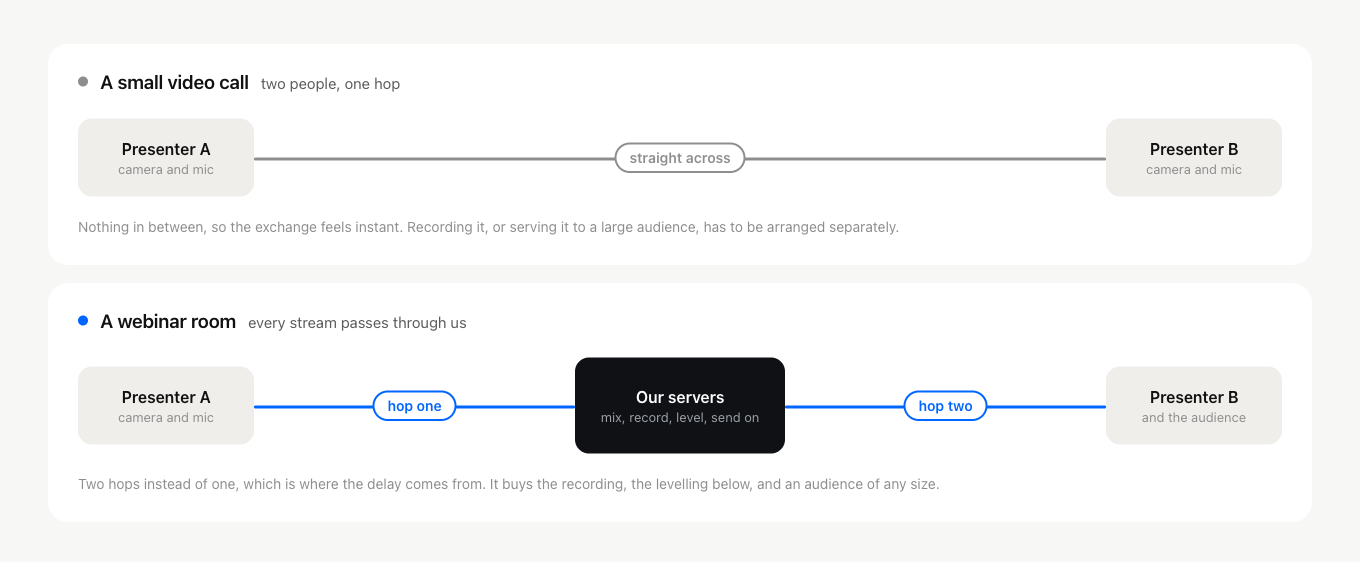
The trade-off shows up once the audience grows. That design makes recording the conversation, or serving it to thousands of viewers, hard to arrange without extra machinery, because there is no single place where the whole event exists.
Where the milliseconds actually go
A webinar room puts our servers in the middle, and the round trip picks up time in four places.
Your machine captures and encodes the picture and sound, which is not instant even on a fast computer. That stream travels to our servers. There it is handled, recorded and passed on. Then it travels out to the other presenters and to the audience, where each device decodes and draws it.
The network legs are the ones you can influence. Distance matters, so a presenter sitting far from our servers in Germany and Finland waits a fraction longer than one nearby. Congestion matters more, because a busy line adds far more delay than geography does.
Why everyone waits for the slowest link
One design decision is worth knowing about, because it explains a result that looks unfair at first glance.
The delay between all presenters is levelled to match the slowest connection in the room. A presenter on a fast wired line is deliberately held back to the pace of the one on hotel wifi.
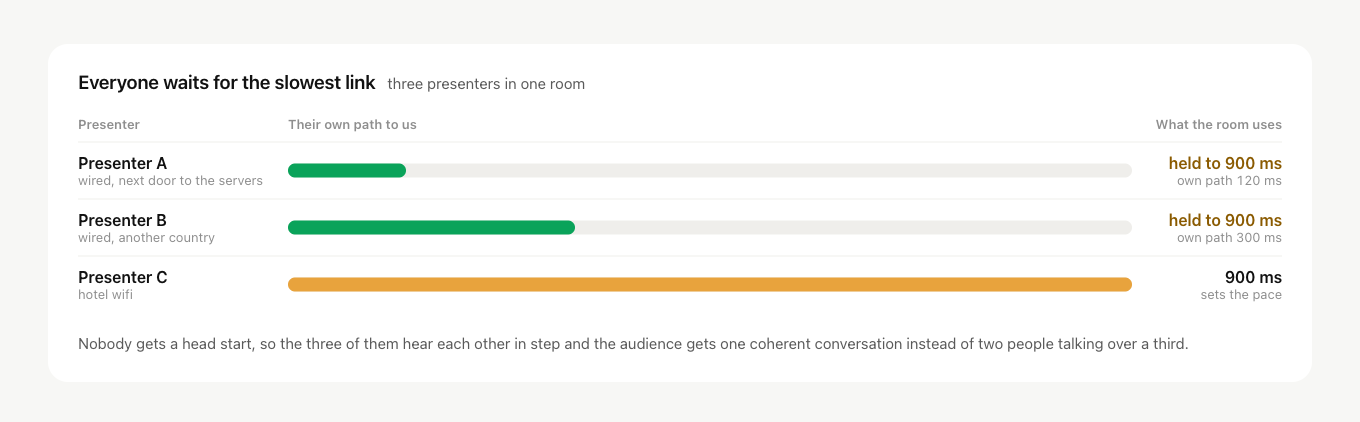
Without it, the presenter with the best line would hear a question a beat before everyone else and answer into a gap the others had not reached yet. The audience would get two people talking over a third. Levelling costs the fast presenter a little time and buys a conversation that holds together.
It also means one weak link sets the pace for the whole room, which is why the checks below are worth the few minutes they take.
How to keep the delay out of the way
- Get every presenter into the room before the event and check the link with each of them, while there is still time to fix what you find. Our connection tester is a quick way for each of them to check their own line first.
- Leave room for pauses. Ask a question, then wait a beat before you assume nobody is answering. Your co-presenter is probably already talking.
- Use a stable, fast connection, wired wherever that is possible. It does more for this than any setting.
- Close downloads and streaming services on every presenter's machine so nothing else is competing for the connection.
- If one presenter is stuck on a poor network, the alternative broadcasting technology holds a steadier stream than the browser manages on its own.
A small delay is normal on any platform that records and broadcasts to a large audience. It is the price of the recording and the scale you get in exchange, and planning your pauses around it is usually enough to keep it invisible to your audience.
If a particular room or a particular presenter is consistently worse than that, open the online chat and we will take a look at it with you.
Frequently asked questions
How much delay between presenters is normal?
On a healthy connection the gap sits between 100 and 600 milliseconds. It varies from one webinar to the next and from one guest presenter to the next, and broadcast latency covers the figures and how they move. If a particular room or a particular presenter is consistently worse than that, open the online chat and we will take a look at it with you.
Will a faster connection get rid of the delay completely?
No. Part of the gap is your machine capturing and encoding the picture and sound and each receiving device decoding and drawing it again, which happens whatever the line is doing, and the stream still has to reach our servers and travel back out. The network legs are the ones you can influence, and a small delay is normal on any platform that records and broadcasts to a large audience.
Does it matter where in the world my presenters are?
A little. Distance matters, so a presenter sitting far from our servers in Germany and Finland waits a fraction longer than one nearby. Congestion matters more, because a busy line adds far more delay than geography does, which is why closing downloads and streaming services on every presenter's machine is on the checklist and moving anybody closer is not.
One of my presenters is on a hotel connection. What can I do before we go live?
Get every presenter into the room before the event and check the link with each of them, while there is still time to fix what you find, and our connection tester is a quick way for each of them to check their own line first. Ask them to use a stable connection, wired wherever that is possible, and to close downloads and streaming services. If one of them is stuck on a poor network, the alternative broadcasting technology holds a steadier stream than the browser manages on its own.
We keep talking over each other on air. Is there anything to do besides fixing the line?
Leave room for pauses. Ask a question, then wait a beat before you assume nobody is answering, because your co-presenter is probably already talking. Planning your pauses around the gap is usually enough to keep it invisible to your audience.
