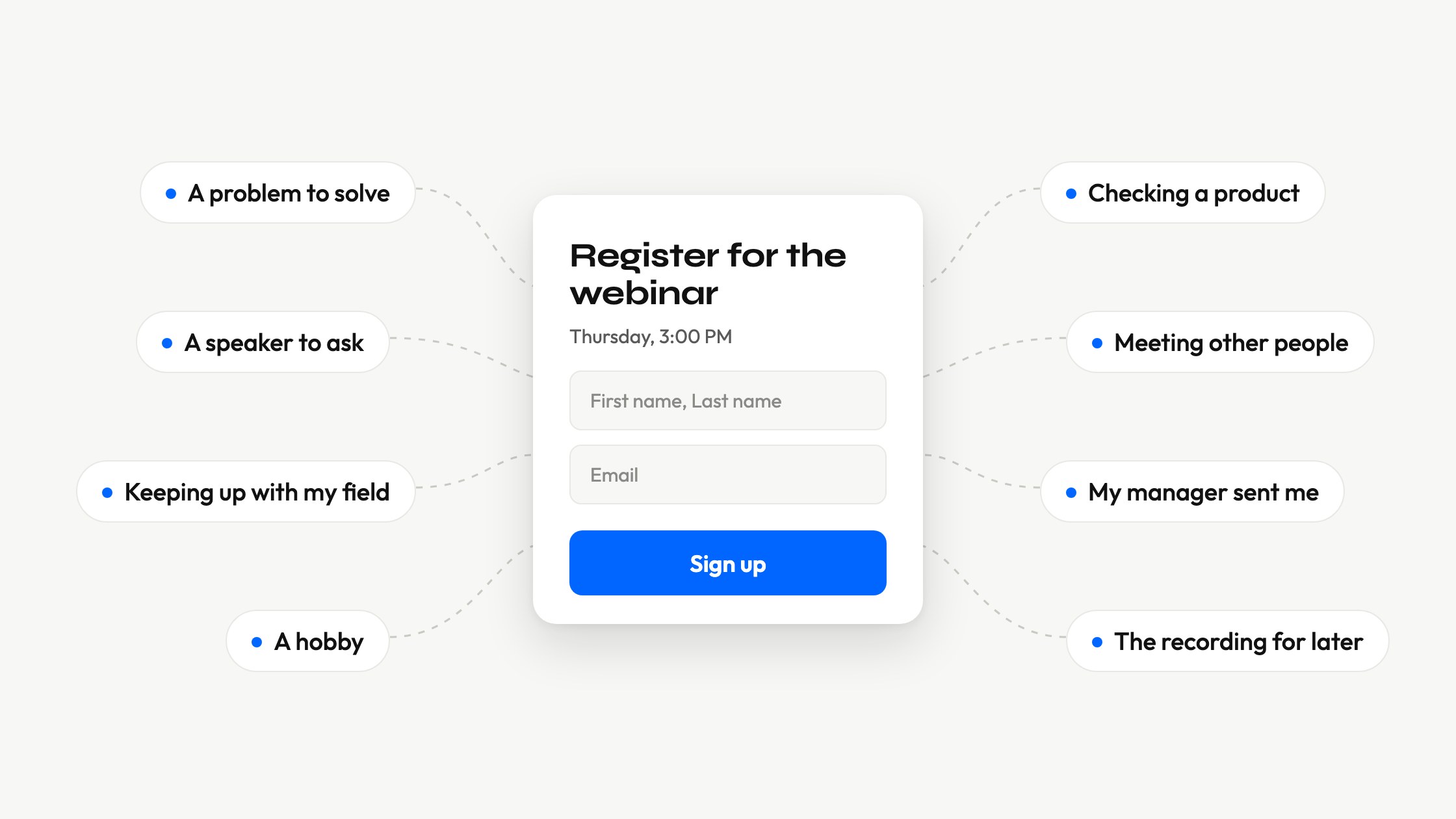
Every registration for a webinar has a reason behind it. One person has a problem to solve this week. Another wants to hear a certain speaker. A third only wants the recording. They all fill in the same form, but they will not behave the same way on the day of the webinar.
This article looks at those reasons. It uses published surveys rather than guesses, and it looks at two questions separately. Why do people sign up? And why do only some of them come to the live session? The answers are different, and they affect how you plan the registration page, the reminders and the session itself.
Registration and attendance are two separate decisions
Signing up takes a minute and costs nothing. Attending takes an hour at a time that somebody else chose. The first decision is easy. The second has to compete with everything else the person has to do that day.
The numbers show the gap. Goldcast studied 26,190 business-to-business (B2B) webinars held on its platform in 2025. On average, 40% of the people who registered came to the live session, up from 33% a year earlier. Even in a good year, most people who registered did not come. Goldcast published these figures in its 2026 B2B Webinar Benchmark Report.
Psychologists call this the intention-behavior gap, the distance between what people plan to do and what they do. Paschal Sheeran and Thomas Webb summed up this research in a 2016 review. They show that even a big change in what people plan leads to a much smaller change in what they do. The gap comes mostly from people who meant to act and then did not. The usual reasons are simple. They forget, they miss the moment, or they skip a small step they needed to take first.
A registration is a plan. It tells you that someone is interested, but it does not promise that they will come. That is why your work does not end when someone registers.
Why people register for webinars
Below are the most common reasons. Where a survey asked people about a reason directly, we give its numbers.
A problem they want to solve
The topic is the strongest single reason. In a survey of 600 doctors about medical webinars, 81.5% said the most important thing when choosing a webinar was a topic relevant to them. Well-known speakers came second with 10.7%, and a convenient time came third with 7.2%.
The same doctors preferred narrow topics. 71.7% chose very specific topics, such as the treatment of one disease, over broad overviews.
A survey of ordinary consumers shows the same thing. HubSpot asked 400 people which webinar format sounded most engaging. The most common answer, at 30%, was a presentation that teaches how to do something specific.
People register to get a specific result. A title like "How to get new employees up to speed in their first week" promises a result. "Trends in employee training" does not.
A speaker they want to hear or ask
The speaker is the second reason, and it usually goes together with the topic. People want an answer from someone who knows the subject well. In the survey of doctors, more than half (54.8%) preferred talks by well-known speakers from their own country.
A live session gives one thing that a recording cannot. You can ask your own question. When the same doctors explained why they watched live, the most common reason was the chance to ask about things they did not understand (31.2%).
Keeping up with their field
Many professionals register to stay up to date. In the survey of doctors, the second most wanted type of webinar was about new developments in medicine (39.5%). Only webinars that show clinical or surgical skills were more popular (47.5%). For many professionals, this kind of learning is part of the job.
A hobby or a good time
Not every registration is about work. In HubSpot's consumer survey, 27% were most likely to attend webinars about a passion or a hobby. Another 24% chose webinars that entertain them. Only 18% chose webinars about their career or industry. HubSpot notes that it asked a general audience of all ages. A business audience would probably choose work topics more often.
Checking a product before buying it
A product demo or a case study attracts people who are already comparing products. They want to see the product in action, hear how it solves a problem like theirs and decide whether they trust the company. A webinar lets them do all of that without talking to a salesperson.
Other people in the room
Some people come for the audience as much as for the speaker. In the survey of doctors, 10.7% said they watched live to interact with other participants. It is a small group, and they can only get this in a live session.
Someone else told them to come
Some attendees did not choose the webinar at all. A manager booked a training session, a teacher scheduled a class, or a business partner invited them. They come because they have to, and they often need proof that they attended.
Getting the recording for later
Many people register only so they can watch later. Half of the doctors (49.3%) preferred a recorded webinar to a live one. Their reasons were practical. They could pause and continue (35.2%), the live time did not suit them (26.3%), and they could jump to the parts they needed (24.2%).
But a plan to watch later is also just a plan, and it often fails in the same way. In Goldcast's 2025 data, 89.1% of webinars had a recording available after the event. But only 2.62% of the people who registered watched the recording without coming to the live session. Very few of the people who missed the live session watched it later.
Which reasons bring people to the live session
A recording can fully meet some of these reasons. Others can only be met in a live session. The table shows our view of each reason, not survey data.
| Reason | Can a recording meet it? | What makes this person come live |
|---|---|---|
| A specific problem | Mostly | A clear promise of the result and a reminder before the start |
| A question for the speaker | No | A real Q&A, announced on the registration page |
| Keeping up with their field | Mostly | Something the recording will not have, such as live answers |
| A hobby or a good time | Mostly | A good host and a time that suits this audience |
| Checking a product | Partly | A live demo where their own questions get answered |
| Other people | No | An open chat and a chance to speak |
| Someone else told them to come | Depends on the rules | Attendance that is recorded and counts |
| Getting the recording | Yes | Very little, and that is fine |
The strongest reason to come live is something that only happens live. The doctors confirm this. Their second most common reason for watching live was that they could not watch the webinar later (26.0%).
Still, keep recording your webinars. About two thirds of the same doctors (65.8%) wanted to watch a webinar again when a recording existed. Decide in advance who gets the recording and when, and say so on the registration page.
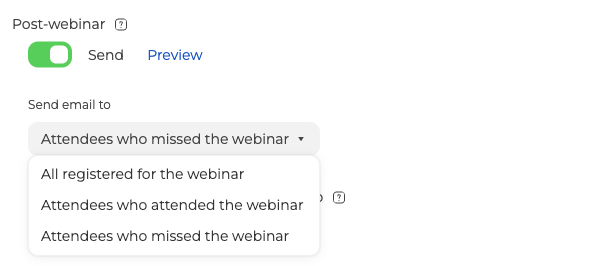
In MyOwnConference you set this on the "Emails" tab of the webinar settings. The "Post-webinar" message can include a link to the recording, and "Send email to" chooses who receives it. The choices are "All registered for the webinar", "Attendees who attended the webinar" and "Attendees who missed the webinar". The link stops working after 30 days unless you change the date. A recording link needs a plan of a month or longer. It is not available on the free Starter plan or on a daily plan.
Plan the registration page around these reasons
When you know why people register, you know what the registration page must do. It must show each visitor that they will get what they came for.
Put the result in the title. In MyOwnConference the title appears in more places than you might expect. It is in every email, at the top of the registration page and inside the room. Write it for someone who has never heard of your event.
Show the agenda and the speakers. People who come for the topic look for the agenda. People who come for the speaker look for names. On the "Entry" tab, "Show the webinar details" puts a short overview or a full agenda on the registration page. "Show webinar moderators" adds the people who will present.
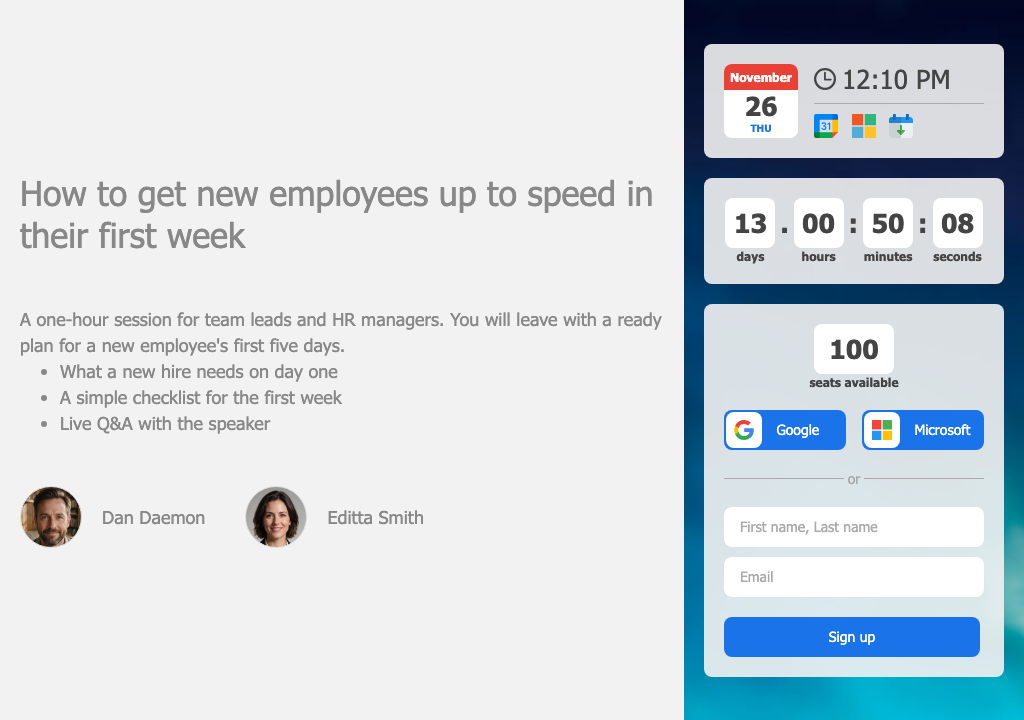
Say what happens only live. If there will be a Q&A, write that on the page. Say what the recording will include and who will receive it, so nobody signs up expecting something you do not plan to send.
Ask only for what you will use. The form starts with a full name and an email, and "+ Add field" adds fields such as "Position", "Specialty" or "Company". Every field you add is mandatory by default, so every extra field means fewer sign-ups. The "Position" or "Specialty" field often tells you whether someone does the work or decides what to buy.
Help people remember until the start
Many people who register and do not come simply forget, or the start time arrives while they are busy. Research also suggests a fix. Sheeran and Webb describe if-then plans as one of the best-tested ways to turn a plan into action. An if-then plan links a moment to an action, for example "if it is Tuesday at 3 p.m., then I open the link". A calendar entry is a ready-made if-then plan.
MyOwnConference sends eight automatic emails for each webinar, and all eight are on by default. "Confirmation" goes out the moment someone registers. Then the "3-day reminder", the "1-day reminder" and the "1-hour reminder" count down to the start. "Latecomers" goes to anyone who has not joined after the webinar has started. The article on when webinar email notifications are sent lists the rest.
On the same tab, "Include calendar invite" attaches a calendar file to the emails. You can also add a short description to the calendar entry. Then people still know what it is when they see it days or weeks later. Use it to repeat the result they signed up for.
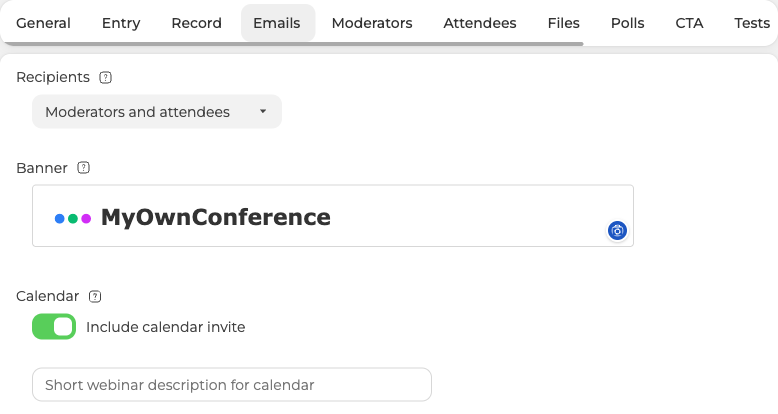
You cannot change the main text of these emails. This is on purpose, because fixed wording helps keep them out of spam folders. You can change the title, the banner at the top and the calendar description. That is enough to remind people why they registered.
The time of the session matters too, and it depends on the audience. 62.8% of the doctors preferred weekends, and 52.8% preferred the evening, between 4 and 8 p.m. A sales team would probably answer differently. The best days to schedule a webinar depend on who you are inviting.
Give each group what it came for
The registration page makes promises, and the session has to keep them. Each group of attendees needs something different.
People with a problem need the promised result early. Show it in the first part of the session, and repeat it in a short summary before the end.
People with a question need a way to ask it. Turn on "Enable Q&A section" in the webinar settings. When a moderator bookmarks a question in the chat, it goes into the "Questions" list. Attendees can give each question a thumbs up or a thumbs down. The counts show which questions matter to most people in the room.
Some people never ask at all. In the survey of doctors, 36.3% did not ask because they wanted to read more about the topic first. Another 15.6% worried that their question was too basic. A private chat helps them. With "Enable private chat with moderators" on, attendees find "Ask the question" under "Feedback" in their room menu. Our guide to webinar moderation techniques shows how to handle questions so that none get lost.
People who came to meet others need a chance to take part. Keep the chat open, ask for reactions at planned moments, and invite an attendee to speak on air when it fits the topic.
People checking a product need a next step. A call to action button in the room gives them one. The "CTA" tab of the webinar report counts the clicks on it.
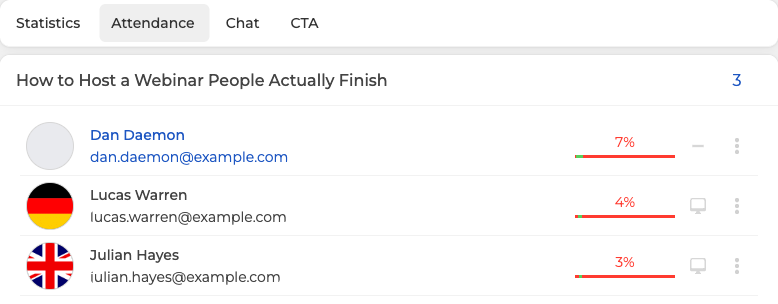
People who had to come need proof that they attended. The "Attendance" tab of "Webinar insights" shows one row per person, with the percentage of the session they spent in the room. If the webinar leads to a certificate, a test shows who understood the material. The platform scores the test and gives you the results. You issue the certificate yourself.
Find out why your own audience registered
Surveys describe other people's audiences. Your audience may have different reasons. Three steps will help you find them.
Ask at the start. Open the session with a one-question poll, such as "What brought you here today?", and offer four or five answers based on the reasons above. You start a poll by hand at the moment you choose, and attendees answer without leaving the room. The results stay in "Storage", on the "Polls" tab. The polls and surveys page shows what else they can do.
Check how long people stayed. The "Engagement" block shows a graph of how many people were in the room during the session. A sudden drop after the main demo means something different from a slow decline over the whole hour. Webinar statistics and reports explains every block of the report.
Ask again at the end. The "Thank you page" on the "General" tab is where attendees land when the webinar ends, or when they leave early. That makes it the right place for a short survey.
After two or three webinars, compare the answers with the topics you chose. The reasons that brought your audience in will tell you what to write in your next title.
FAQ
What is the main reason people attend webinars?
The topic. In a survey of 600 doctors, 81.5% said a topic relevant to them was the most important factor. Famous speakers (10.7%) and a convenient time (7.2%) came far behind. People register to get a specific result, so a narrow, practical title attracts more interest than a broad one.
Why do people register for a webinar and then not attend?
Registering is easy, but attending has to compete with everything else in the day. Psychologists call this the intention-behavior gap. Research shows that it comes mostly from people who planned to act and did not, often because they forgot or missed the moment. Reminders and a calendar entry help with both causes.
Does offering a recording reduce live attendance?
It can remove one reason to come live. In one survey, 26.0% of doctors said they watched live because they could not watch later. But in Goldcast's 2025 data, only 2.62% of the people who registered watched the recording without coming live. Decide who gets the recording, and say so on the registration page.
What is a good webinar attendance rate?
In Goldcast's study of 26,190 B2B webinars held in 2025, the average was 40%, up from 33% a year earlier. Studies count attendance in different ways. Some include people who watched the recording, and others do not. Compare your rate only with a study that counts it the same way you do.
How can I find out why people registered for my webinar?
Ask them at the start of the session with a one-question poll. Offer four or five answers, such as solving a problem, asking the speaker, keeping up with the field or getting the recording. Then compare the answers with how long people stayed and with the replies to a short survey after the webinar.