
Information page after registration
After someone registers for your webinar, you can send them to a page of your choosing instead of leaving them on a plain confirmation. You might use it to say thank you, to point people at another product or a subscription, or to walk them through installing your software.
Turning the info page on
Open the settings of your webinar, go to the "Entry" tab and scroll to the bottom. The field is called "Info page", and its box reads "Link to the information page" until you fill it in.
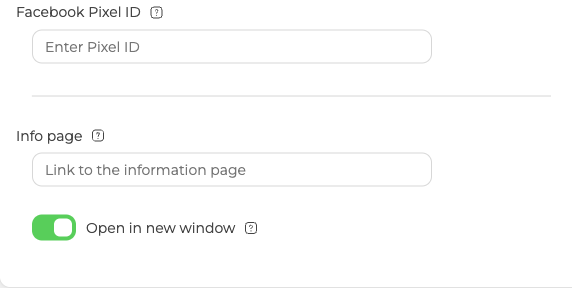
Paste your link and click "Done". Everyone who registers from that point on lands on the page you specified. The address can carry UTM tags, so those visits show up in whatever you already use to measure campaigns.
Where the page opens
The toggle under the field is called "Open in new window", and it decides that. Switch it on and the link always opens in a new browser window. Leave it off and the link opens in the same window, but only before the webinar starts. Once the webinar has started the link no longer opens, and anyone arriving goes straight into the webinar room.
Not the same as the thank you page
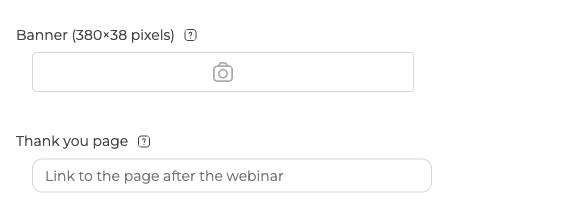
The "General" tab has a field called "Thank you page", and the two are easy to mix up. The info page comes before the webinar and the thank you page comes after it. Whatever you put in "Thank you page" is where attendees land once the webinar ends, or once they leave early, which makes it the place for a survey or a feedback form.
Events that behave differently
The field is not offered everywhere, and where it is offered the toggle does not always come with it.
A permanent room has the "Info page" field at the foot of its "Entry" tab, but nothing underneath it. There is no "Open in new window" toggle in a room, so where the page opens is not something you set there.
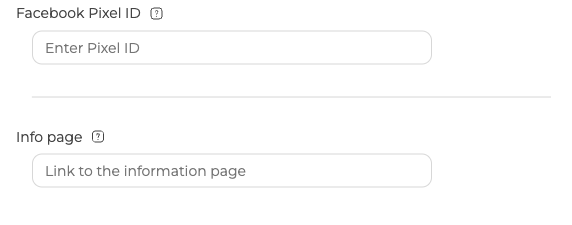
A room switched into landing page mode works the same way. "Info page" is the last thing in the panel, again with no toggle under it.
A scheduled webinar with "Invitation link login only" switched on has neither. That switch strips the "Entry" tab back to the essentials, and "Info page" goes along with the login form, the general guest link and the background settings. Personalized access links covers what else changes in that mode.
If the page your attendees land on is not the one you expected, open the online chat and tell us the event and whether "Invitation link login only" is switched on.
Frequently asked questions
Does changing the link affect people who have already registered?
No. Everyone who registers from the point you paste the address and click "Done" lands on the page you specified, so a change part way through a campaign reaches later registrations only. The field sits at the foot of the "Entry" tab, so you can edit it again whenever the destination changes.
Can I measure how many people reach the info page?
Yes, if you tag the address before you paste it. The link in "Info page" can carry UTM tags, so those visits show up in whatever you already use to measure campaigns.
Why is there no "Open in new window" toggle on my permanent room?
Rooms do not have one. A permanent room has the "Info page" field at the foot of its "Entry" tab with nothing underneath it, so where the page opens is not something you set there. A room switched into landing page mode works the same way, with "Info page" the last thing in the panel and no toggle under it.
What do people see if they follow the link once the webinar has started?
They go straight into the webinar room. With "Open in new window" switched off the link opens in the same window, but only before the webinar starts, and after that it no longer opens. Switch the toggle on and the link always opens in a new browser window.
Where do I send people for a feedback survey after the webinar?
Use "Thank you page" on the "General" tab rather than "Info page". Whatever you put there is where attendees land once the webinar ends, or once they leave early, which makes it the place for a survey or a feedback form. The info page comes before the webinar and the thank you page comes after it, which is the whole difference between them.
