
Time zones and webinars
The time zone in your account is the zone you schedule in. Type 4:00 PM into a webinar and the platform reads that as 4:00 PM in your zone, and every start time, reminder and registration page follows from the moment that produces. The panel says as much in its own help text, that all scheduled webinars adhere to this setting.
What the zone does not decide is the hour your audience reads, because they are given the time in theirs.
Where the setting is
Open your profile from the card at the bottom of the sidebar and stay on the "Profile" tab. "Time zone" is the second setting down.
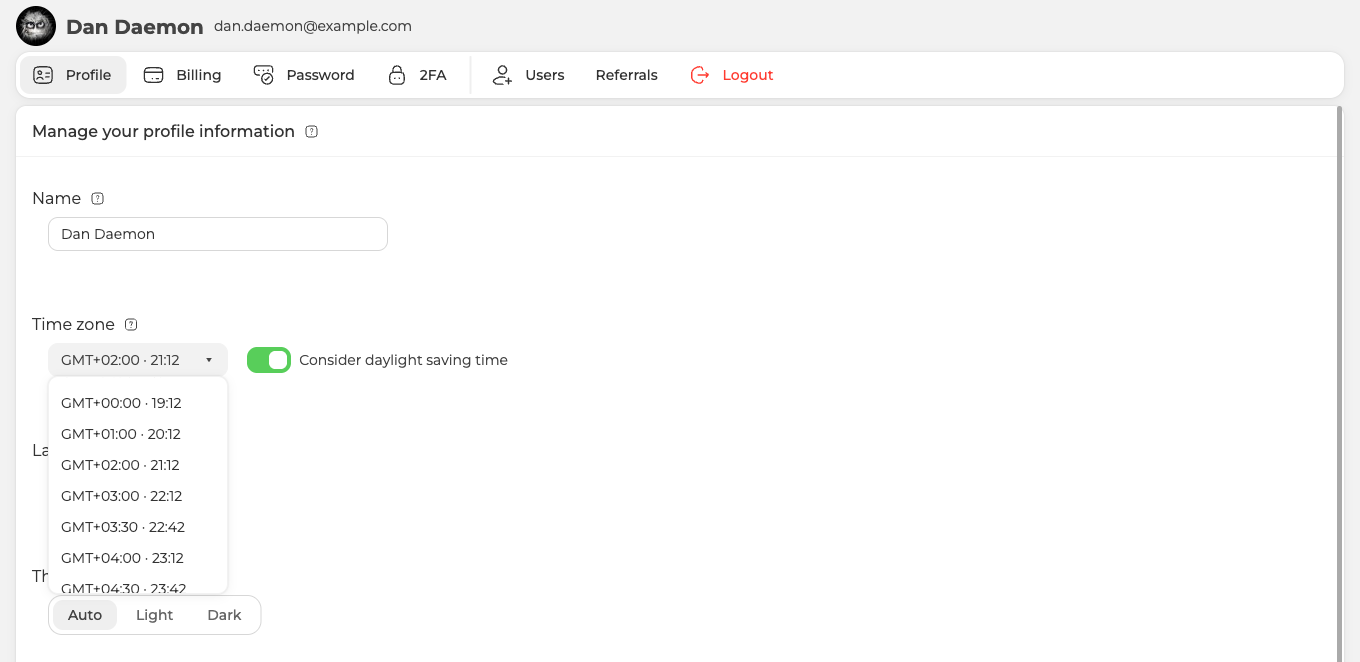
Every zone in the list carries its current local time next to the offset, so the quickest way to pick the right one is to find the entry whose clock matches the clock in front of you. The field keeps showing that time after you choose, which makes it a standing check you can glance at. If the time beside your zone is not your time, the zone is wrong.
The setting belongs to the account rather than to one webinar, so it applies to everything you schedule from then on.
What your attendees see
They see the start converted into their own local time, and they have nothing to work out. One webinar, opened at one moment from four places, reads like this.
| Where the visitor is | What the registration page shows |
|---|---|
| GMT+2 | 9 August, 11:00 PM |
| New York, GMT-4 | 9 August, 5:00 PM |
| Tokyo, GMT+9 | 10 August, 6:00 AM |
| UTC | 9 August, 9:00 PM |
Four different clock readings, one instant, and the countdown on the page runs to the same second for all of them. Planning a webinar covers the same ground from the scheduling side.
So the danger is not that somebody reads the wrong hour. It is that a wrong zone makes you schedule the wrong instant, and then everybody arrives punctually at a time you did not mean. That is also why announcements you write yourself, in a social post or in your own mailing, are worth stamping with an offset, for example 4:00 PM GMT+2. Nothing converts your own copy for you.
Daylight saving
Beside the zone sits "Consider daylight saving time", and it is on unless you turn it off. With it on the platform follows the seasonal clock change for you and moves your event times along with it. With it off your times stay exactly where you put them while the clocks change around them.
Either way, an event scheduled close to a switch deserves a second look, and so does an audience in a region that switches on a different date from yours.
If a webinar went out at the wrong hour
- Check the clock beside your zone. If it does not match your own, the zone is wrong, and every event created under it is off by that difference.
- Fix the zone, then check the events. Reopen each scheduled webinar and confirm its start reads the hour you meant before you announce anything again.
- Confirmations already sent cannot be corrected. They carry the hour they were sent with, so the people who received them need to hear the new time from you directly.
- Moving or travelling does not move the setting. It stays where you last put it, which is worth remembering after a relocation rather than a holiday.
If the hours still do not line up after all of that, open the online chat and tell us the event, the zone set on your profile and the hour your attendees report seeing.
Frequently asked questions
Can I set a different time zone for one webinar?
No. The zone belongs to the account rather than to one webinar, so it applies to everything you schedule from then on. What it does not decide is the hour your audience reads, because each of them is shown the start converted into their own local time.
Do I need to state a time zone in an announcement I write myself?
Yes, and stamping it with an offset such as 4:00 PM GMT+2 is the way to do it, because nothing converts your own copy for you. The registration page handles the conversion on its own and its countdown runs to the same second for everybody, but a social post or your own mailing carries whatever hour you typed.
My audience is in a country that changes its clocks on a different date from mine. What should I check?
Look again at any event scheduled close to either switch, because that is where a mismatch shows up. "Consider daylight saving time" sits beside the zone and is on unless you turn it off, and with it on the platform follows the seasonal clock change and moves your event times along with it. With it off your times stay exactly where you put them while the clocks change around them.
I have already sent confirmations with the wrong hour. Can they be corrected?
No. They carry the hour they were sent with, so the people who received them need to hear the new time from you directly. Fix the zone first, then reopen each scheduled webinar and confirm its start reads the hour you meant before you announce anything again.
I have moved to another country. Does my time zone follow me?
No. It stays where you last put it, which is worth remembering after a relocation rather than a holiday. Checking takes a second, because every zone in the list carries its current local time, so if the clock beside your zone is not your clock the zone is wrong. You change it on the "Profile" tab, opened from the card at the bottom of the sidebar.
