
How long does a free account stay active?
The Starter plan has no expiry date. You can keep using it for as long as you like, within the limits of the plan, and it never turns into a paid subscription on its own. Our user agreement calls the plan everlasting in section 5.1.
The account that holds it does have one condition attached, and it is a simple one.
Sign in at least once every six months
If nobody logs into a free account for six months, we delete it automatically, and everything in it goes at the same time. That covers your recordings, your uploaded materials and your webinar history. Registering again afterwards gives you a new empty account rather than the old one back.
You get a warning first. Before an account is removed we send you an email about it, so the deletion is never the first you hear of it. That does mean the address on the account has to be one you still read. Notice before deletion is what sections 3.3 and 3.4 of the user agreement commit us to.
Signing in is all it takes to reset the clock. You do not have to hold a webinar, upload anything or open a particular page, so if you are between projects, a visit to the control panel every few months keeps everything where it is.
Nothing else is on a timer
As long as you keep signing in, your material is not removed for being old. Recordings, uploaded materials and room configurations stay in your account until someone deletes them on purpose, and a recording does not expire the way a shared link does. Webinar history is the one thing with a separate limit, because statistics and reports are kept for a year.
What limits you then is storage rather than time. Every recording and every uploaded file takes up part of the cloud storage included with your plan, and the Starter plan comes with 500 MB. You can watch that filling up at the foot of the "Storage" section, which shows how much of your allowance is gone. When it fills, the answer is to download what you want to keep and delete it, or to move to a plan with more room. The pricing page lists how much storage each plan includes.
We do not tidy up your account
Apart from the six-month rule, we do not go in and remove things. Deleting a file, an event or a webinar is something only somebody who can sign in to your account does, and the control panel asks them to confirm first. The dialog warns that the action cannot be undone, though in practice the file waits seven days in the Trash before that becomes true. Our support agents cannot do it on your behalf.
The remaining exceptions are written down rather than left to us, and they are about conduct rather than housekeeping. Section 8.4 of the user agreement lets us suspend or terminate the service, without notice and without a refund, over content we find illegal or offensive, and sections 9.7 and 17.3 cover complaints and abuse of our support team.
That makes account access worth checking now and then. Anyone you have granted full access to your control panel or webinar rooms can delete material, so hand that out only to people you trust.
The Trash empties itself after seven days
Deleted material does not vanish straight away. It moves to the "Trash" tab of the "Storage" section and waits there for seven days, which gives you a window to put it back with "Restore", or to open the online chat and ask us to recover it. After seven days it is gone for good.
Waiting in the bin does not count against your storage, so if you deleted something to make room, the room is already yours.
What happens when a paid plan ends
When a paid plan reaches the end of its term the account is not closed, and nothing is charged. It moves to the Starter plan. You can see both halves of that on the "Subscription" screen, where the paid card gives the date it expires and the free card gives the same date as the day it takes over.
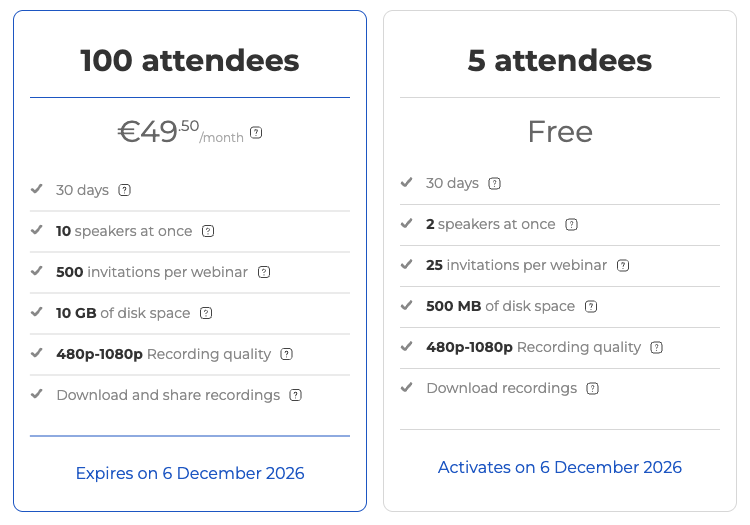
Your files are not deleted at that moment, but access to what you have stored is restricted, because the allowance around it has shrunk to the free one. Paying for a plan again lifts that automatically, and you have 180 days to do it. Will my payment card be automatically charged? covers the billing side of the same moment.
Those are the same 180 days the account has as a free one, so the rule at the top of this page applies to it now like any other. Sign in and it stays. Leave it alone for the whole six months and it goes, with everything in it.
If an account has gone and you believe the 180 days had not run out, open the online chat and tell us the address it was registered to and roughly when you last signed in.
Frequently asked questions
Can I get my account back if it was deleted for inactivity?
No. Registering again afterwards gives you a new empty account rather than the old one back, and the recordings, uploaded materials and webinar history went with it. If you believe the six months had not run out, open the online chat and tell us the address the account was registered to and roughly when you last signed in.
How long is my webinar history kept?
For a year. Webinar history is the one thing with a separate limit, because statistics and reports are kept for twelve months. Recordings, uploaded materials and room configurations have no such limit and stay in your account until someone deletes them on purpose.
What happens when my storage allowance fills up?
Nothing of yours is removed to make space, because apart from the six-month rule we do not go in and delete things. The answer is to download what you want to keep and delete it from the account, or to move to a plan with more room. You can watch the allowance filling at the foot of the "Storage" section, and the pricing page lists how much storage each plan includes.
Does material sitting in the Trash still use my storage allowance?
No. Waiting in the bin does not count against your storage, so if you deleted something to make room, the room is already yours. The file stays recoverable with "Restore" on the "Trash" tab of the "Storage" section for seven days, after which it is gone for good.
Can somebody else delete my recordings?
Yes. Anyone you have granted full access to your control panel or webinar rooms can delete material, so hand that out only to people you trust. The control panel asks them to confirm first, and the file still waits seven days in the Trash before that becomes final. Our support agents cannot delete anything on your behalf.
