
Why did my webinar recordings disappear?
Nothing on our side reaches into a working account and removes one recording. Recordings stay put until someone deletes them on purpose, however long that takes. So if the rest of your material is still there and one recording has gone, it was deleted by hand from an account someone had access to, and for the first seven days it is still recoverable.
If instead the account is empty, with no files, no webinars and nothing in the Trash, you are looking at something else, and the section below on unused accounts explains it.
Start with the Trash
Open the "Trash" tab of the "Storage" section in your control panel. It sits at the end of the row beside "Files", "Recordings", "Polls", "CTA" and "Tests". Deleted material waits there, so a recording removed less than seven days ago is still in the bin.
Open the three dots on the row and choose "Restore", confirm, and the file returns to the tab it came from. Selecting rows and using the "Restore" link at the top of the list does the same for several at once.
Seven days is the whole window, counted from the moment of deletion. During it you can restore the file yourself, or open the online chat and ask us to recover it for you. After that the data is permanently removed from our servers and nobody can bring it back.
Who is able to delete a recording
Within a working account, recordings and other materials go only when somebody deletes them. Two groups of people can.
The first is anyone you have added under "Users" in your profile, which is where access to the control panel is handed out. Each person gets their own set of permissions, and the one that matters here is "Storage management", because that is what allows deleting files and recordings.
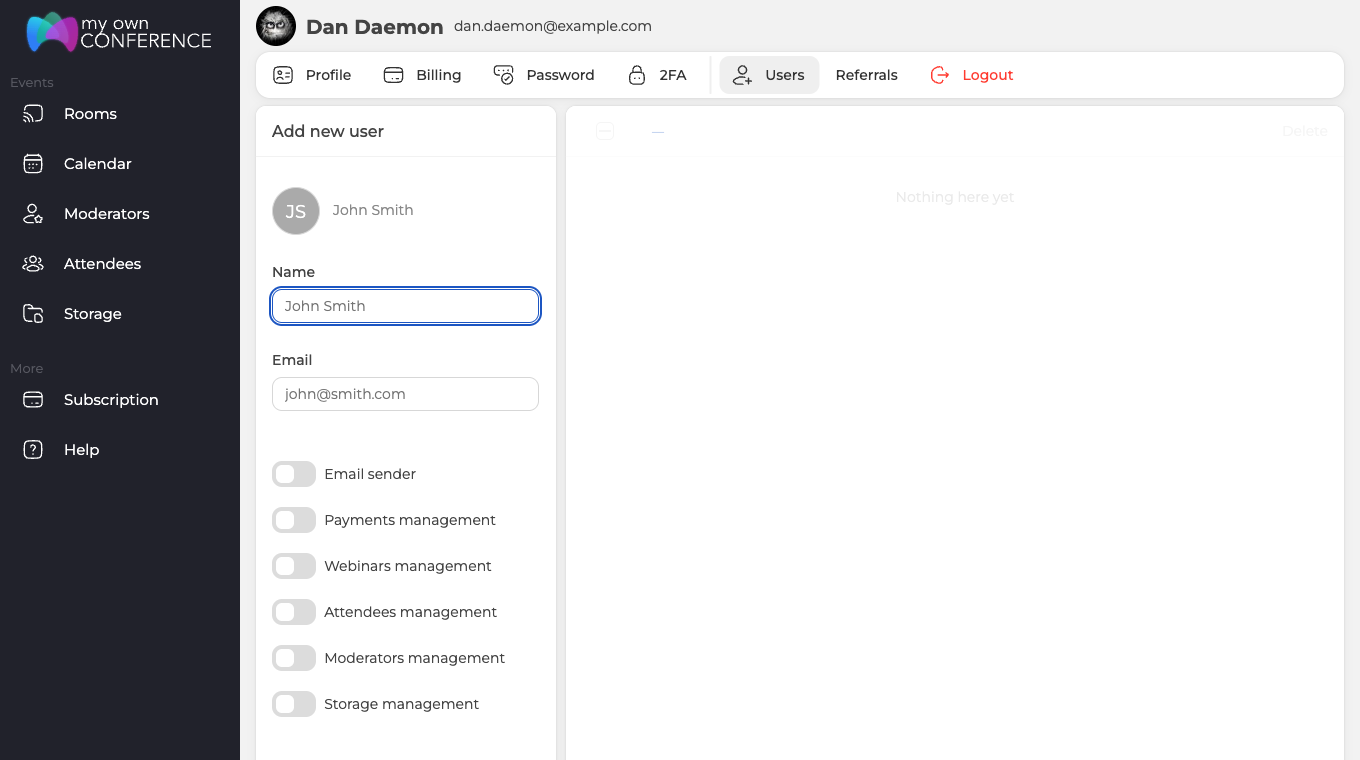
The second is the account owner, whose access cannot be limited.
The platform administration and the support team are not responsible for actions taken by you or by anyone else holding access to your account. Look through "Users" from time to time, and hand out "Storage management" only to people who genuinely need it.
Recordings have no expiry date of their own
No recording carries a retention period, and none of them has a clock counting down. A recording made two years ago is still there if nobody deleted it and the account has stayed in use.
When the account is the answer, not the file
Two things do get removed automatically, and both work on the account rather than on one file, so they look different from a hand deletion.
A free account that nobody signs into for six months is deleted along with everything in it, which How long does a free account stay active? explains. If that happened and you then registered again with the same address, you are signed into a brand new account rather than the old one, which is why it holds nothing at all and the Trash is empty. The giveaway is that your uploaded files and past webinars are missing too, not just the recording.
Webinar history is kept for a year and then removed, which Webinar statistics and reports covers. That takes the figures rather than the recording, so a recording from an old event can outlive its own statistics.
What recordings do use is the cloud storage included with your plan. They stay until you remove them, so storage is the thing to watch rather than any expiry. The pricing page lists how much each plan includes.
Material sitting in the Trash is the exception, and only in one direction. It does not count against your storage while it waits there, and it goes for good after seven days.
When a paid plan reaches the end of its term the account moves to the Starter plan. Your files are not deleted then, though access to them is restricted until you pay for a plan again.
If the Trash is empty
Then the deleted material cannot be restored. If everything else is still in place and only this recording is gone, the account itself becomes the priority, so make sure nobody else can reach it. Your profile holds everything you need for that.
- "Users" lists everyone who can sign in to the control panel. Remove anyone you do not recognise, and take "Storage management" off anyone who does not need it.
- "Password" changes the password, which locks out anyone working from an old one.
- "2FA" switches on two-factor authentication, so a password on its own stops being enough, and platform security walks through switching it on.
- The "API key" on the "Profile" tab grants programmatic access to whoever holds it. If it has ever been shared, generate a new one there with the refresh button next to it, and the old key stops working.
If you cannot account for who deleted the recording, work through all four straight away.
Avoiding a repeat
Share access only with people you have reason to trust, and set clear rules for what they may do with stored material. If you run webinars together with others, make sure everyone involved knows how recordings and files are supposed to be handled.
Frequently asked questions
Can you recover a recording that was deleted more than seven days ago?
No. Seven days is the whole window, counted from the moment of deletion, and after that the data is permanently removed from our servers and nobody can bring it back. Inside those seven days you can restore the file yourself from the "Trash" tab, or open the online chat and ask us to recover it for you.
Does material sitting in the Trash still use up my storage?
No, it does not count against your storage while it waits there. That is the only direction in which the Trash works in your favour, because the file still goes for good after seven days. Recordings you keep do use the cloud storage included with your plan, and the pricing page lists how much each plan includes.
My paid plan ran out. Were my recordings deleted with it?
No. When a paid plan reaches the end of its term the account moves to the Starter plan, and your files are not deleted then, though access to them is restricted until you pay for a plan again. Nothing on our side reaches into a working account and removes a recording.
The recording is still there but the figures for that webinar have gone. Why?
Webinar history is kept for a year and then removed, which is a separate clock from the file itself, so a recording from an old event can outlive its own statistics. Webinar statistics and reports covers what is kept. Recordings carry no retention period of their own and none of them has a clock counting down.
I registered again with the same address and the account is empty. What happened?
You are signed into a brand new account rather than your old one. A free account that nobody signs into for six months is deleted along with everything in it, which How long does a free account stay active? explains, so signing up again with the same address opens a fresh account rather than the old one. The giveaway is that your uploaded files and past webinars are missing too, not just the recording, and the "Trash" is empty.
