
Sign language interpretation
We do not offer automatic sign language interpretation inside the webinar room. Live streaming leaves too little time for it, and the automated tools that exist are not accurate enough to put in front of an audience.
Live streaming leaves no room for it
Our platform is built around real-time streaming, so the whole delivery chain is measured in fractions of a second. Presenters hear and see each other within 100 to 600 milliseconds on a healthy connection, and attendees run a little further behind because they carry an extra buffer of their own, which broadcast latency sets out in full. Converting speech into text accurately, and then interpreting that text into sign language or into another spoken language, needs more time than a window of a few seconds gives.
Automated interpretation is not accurate enough yet
Google and other large companies have worked on automated sign language for years and keep hitting the same wall. YouTube processes uploaded video rather than a live feed, and even with that head start the quality of its automatic captions and translations swings a long way. Give the system a clean recording and a speaker with clear diction, and the result can be quite good. Give it an accent, a technical vocabulary, background noise or two people talking over each other, and the algorithm mishears words, the meaning shifts, and the captions stop being worth reading. A webinar is full of exactly those conditions.
The two obstacles for live use
Technologies for automatic speech recognition and for translation into sign language or captions do exist, including tools built on artificial intelligence. Putting them inside a live broadcast runs into two problems.
The first is that their processing time lands on top of the streaming delay described above rather than fitting inside it. Analysing speech, generating the translation and rendering the signs all take time of their own, so the interpretation would reach your audience noticeably later than the words it belongs to.
The second is cost. Running all of that live takes serious computing power for every event, and that expense would end up in the price of our service whether or not a given webinar needed interpretation.
We follow the progress in this field closely, but quality comes first for us. We are not interested in shipping a feature for the sake of having it if it cannot produce a reliable and accurate result.
What to do instead
We work on a "people for people" principle. Rather than hand you automated interpretation of poor quality, we suggest you arrange interpretation yourself. Two arrangements work well, and the room supports both without any special setup.
A live interpreter on air
Add the interpreter to your event the way you add anyone who speaks, on the "Moderators" tab of the webinar settings, with the "Guest speaker" role. They get a personal entry link from the "Links" menu, join from their own computer, and press "Speak" to go on air, which puts their webcam window beside yours so your audience watches the two of you together. Moderator and presenter management walks through both the role and the link. One thing to plan for is how many speakers your plan allows on air at once. The free Starter plan allows two, which is exactly you and the interpreter, so a second presenter on the same event needs a larger plan.
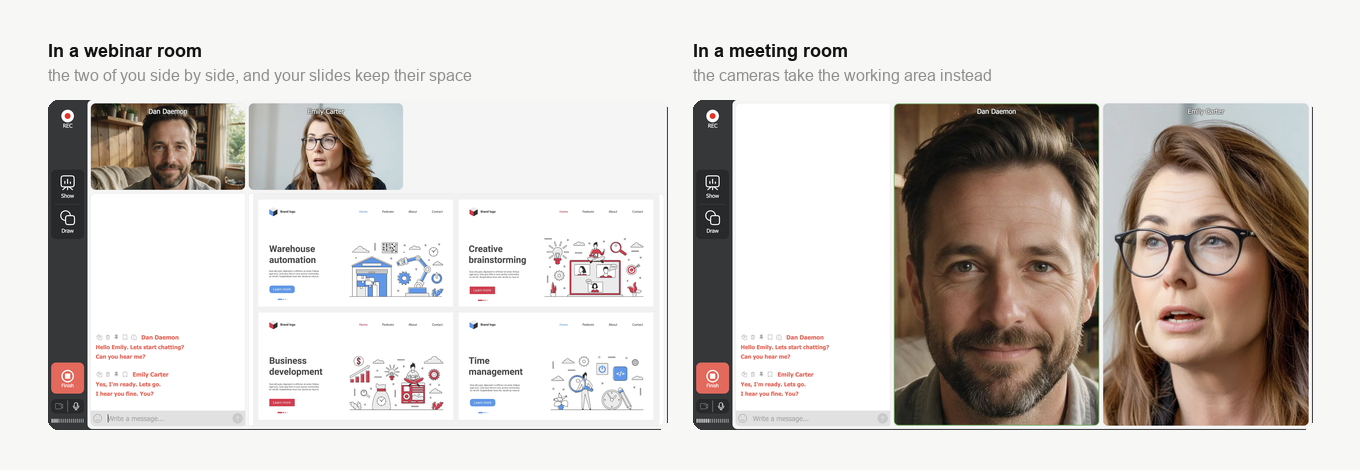
The event mode decides how much room that leaves you. In a webinar room the two of you appear next to each other and the working area keeps its space, so a presentation still has somewhere to go. In a meeting room the cameras take the working area instead, which suits a conversation but leaves nowhere for slides. Webcam position in the live webinar room covers the layouts you can pick between.
Interpretation added to the recording
Download the finished recording as MP4 from "Storage" and hand it to an interpreter and an editor, which finding a recording covers. This route costs you the live audience but buys you accuracy, because the interpreter works from the finished material at their own pace instead of keeping up with a speaker in real time.
If interpretation technology reaches the point where it is reliable and fast enough to run live without hurting quality, we will certainly look at building it in.
If you are arranging an interpreter and want the seats and the roles checked before the day, open the online chat and tell us the event and how many people will be on air.
Frequently asked questions
Can I have the interpreter and a second presenter on air at the same time?
Not on the free Starter plan, which allows two speakers on air, and that is exactly you and the interpreter. A second presenter on the same event needs a larger plan. You add the interpreter on the "Moderators" tab of the webinar settings with the "Guest speaker" role, which moderator and presenter management walks through.
Where do my slides go once the interpreter is on camera beside me?
In a webinar room they keep their space, because the two of you appear next to each other and the working area is left free for a presentation. In a meeting room the cameras take the working area instead, which suits a conversation but leaves nowhere for slides. The event mode is what decides it, and webcam position in the live webinar room covers the layouts you can pick between.
YouTube captions videos automatically, so why can a webinar not do the same?
YouTube processes uploaded video rather than a live feed, and even with that head start the quality of its automatic captions and translations swings a long way. Give the system a clean recording and a speaker with clear diction and the result can be quite good, but give it an accent, a technical vocabulary, background noise or two people talking over each other and the words are misheard and the meaning shifts. A webinar is full of exactly those conditions.
Which is more accurate, a live interpreter or interpretation added to the recording?
The recording, because the interpreter works from the finished material at their own pace instead of keeping up with a speaker in real time. What it costs you is the live audience, since you download the finished recording as MP4 from "Storage" and hand it to an interpreter and an editor afterwards, which finding a recording covers. A live interpreter on air keeps that audience, and the room supports either arrangement without any special setup.
Will you add automatic interpretation later?
We follow the progress in this field closely, and if the technology reaches the point where it is reliable and fast enough to run live without hurting quality, we will certainly look at building it in. Until then quality comes first, and we are not interested in shipping a feature for the sake of having it if it cannot produce a reliable and accurate result.
